Hello Everybody!
I used to be able to change the order of the pages in the Layer Navigator by dragging and dropping them to the desired position in the Page Navigator. Now this no longer works, what am I doing wrong? I have them all in the correct order in the Page Navigator, but the order is not correct in the Layer Navigator.
The Layer Tree page selection dropdown is separate from the Page Navigator. The list in the Layer Tree is just a basic list of all pages for quick access. Details such as ordering, folders, subfolders etc do not show in the Layer Tree page selection list. The more detailed data structure is currently only present in the Page Navigator.
It’s possible we will add more detail to the secondary page selection option found in the layer tree at some point down the line.
I hope that helps
1 Like
Thank you @Norm . Perhaps I have expressed myself in a misleading way. I can change the order of the pages in the Page Navigator, and in Blocs 5 this had an effect on the order of the pages in the Layer Tree. This is no longer the case in Blocs 6. The pages in the Layer Tree are arranged randomly, and even if I change the order in the Page Navigator, the order in the Layer Tree does not change.
Yeah that’s correct the page navigator is more complex in Blocs 6. It’s due to the folders and structuring that’s now possible.
The layer tree menu doesn’t support this new structuring yet.
1 Like
Ah ok, then I can’t rearrange the pages in the dropdown of the Layer Tree Menu. If I have understood correctly, this is planned for the future.
1 Like
Yes thats correct. The Page Navigator is a complete rewrite, the layer tree page selector is older. This will be updated in the future.
3 Likes
Hey @wolfganghofer just following up on this feature request from earlier in the year.
The next beta of Blocs for Mac 6.3 (build 3) will include a brand new Layer Tree Page Selection menu, that matches the ordering of the Page Navigator, it also tags the current site home page and supports folders in the layout.
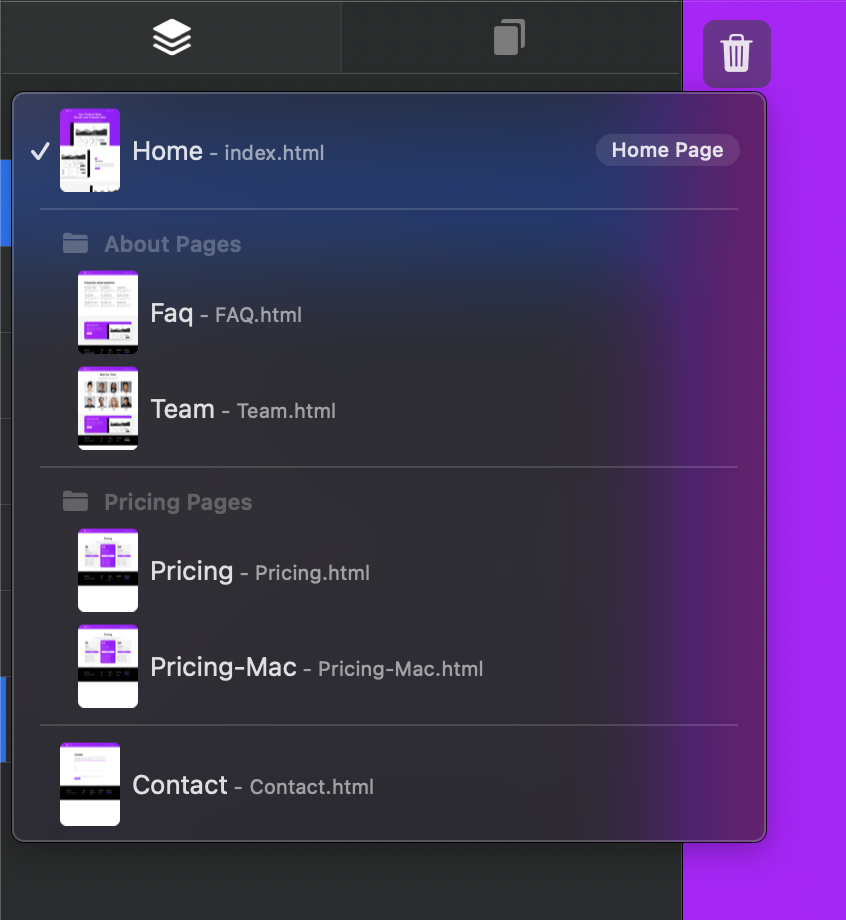
Sorry it took a little while 
You can get your hands on this improvement tomorrow, in beta build 3. 
6 Likes
This is great! Thanks
2 Likes
Great, that’s good to know, thank you!
2 Likes