Gotta tell you Norm, as a non-coder, I have no idea what this “links” change will do to my websites, or what kind of trouble I may be looking at.
As such, I am reluctant to move to 5.1 for now.
I can understand and appreciate the frustration some have mentioned here, who, like me, are just not “coding” type users.
I would respectfully suggest in future Bloc updates, we stay away from forcing someone to have to use code. After all, isn’t that what Blocs has been about since the start? Anyone can use it…
Of course, I could be wrong about having to use code for this links thing, but that is what I see, and I think others in my situation my well look at it the same way.
Just wondering, have you set the colour of the links in your navigation dropdown menus?
This is not something that effects all websites, its very specific use case that many would never even touch.
It will change the colours of navigation links within a dropdown menu back to there default colour (black), rather than white text on white background.
Actually, I just set the text colors…I have not set the drop down links to anything else, though I probably should. I have not set any “hover” changes or stuff like that, and again, I probably should do that. I use Tab Anything LOTS in my sites, and there I do use Link colors, etc, but that is done through the TA menu, so no idea if this change in Blocs will affect all of those?
No argument Jerry. Not even suggesting this change is Norm’s fault. Just saying coding sucks for us non-coders. Which is why we use Blocs. So any way to avoid that is appreciated.
No one is at fault…
I do understand why Bootstrap have done it…but I can also could see that the customer/builder should be able to have their selective colour - this can cause an issue with users I am sure.
@Norm can you override it with a colour select under the “Theme” or have a class we can again override with colours for text in breakpoints?..not sure if you have powers to do this !? or do you have to abide 100% to Bootstrap?
Will move to 5.1 on another machine soon and have a play around soon, so many new features im looking forward to trying.
If you read the original post again, it’s very clear what this change effects from the first line.
This is not a change that will break websites or randomly change things. It resets navigation dropdown links back to their default colour so they look correct on white backgrounds. The code added above is for those who wish to adapt the navigation in greater detail.
I understand the feeling of anxiety, my intention for this post was to do the opposite and explain and offer a solution for the small number of curious users.
Remember themes (or colour modes) are not enabled by default in Blocs, you switch those on per Bloc or container. So if you want to use and customise the dark theme, you are will need to read up on Bootstrap 5 themes/colour modes and write a little CSS.
It’s possible more features will be built around these (Color Mode/ Themes) in future. But for now, if you are unsure, just don’t enable a dark theme on any of the Blocs in your site.
I don’t feel like using this theme now, I would like to have the option to disable it like in b7, it is confusing when the default is selected and the display changes on its own, this is too arbitrary behavior, because that is the intention of the creator, no matter what new features are created, changing the visuals on its own destroys the intention. I strongly hope for a consistent menu or disable option.
I understand that you claim to be localized, but I am manually translating and sending these inquiries, which of course takes time and effort. Please, I ask you not to interfere with the functioning of things as intended. It takes a lot of time for testing and trial and error. I simply want to update web content and do not want existing functionality to be disrupted for the sake of convenience and advanced features.
This is easy, since I don’t use dark themes.
Thank you for the explanation.
For the record, not complaining, just pointing out how I view this particular thing. I think if you are not hearing from us Norm, then you can’t know what to improve/explain or not.
If you want your dropdown menu to be dark with white text, then select Dark Theme from the Bootstrap menu.
If you want your dropdown menu to be white with dark text select the light Theme from the bootstrap menu.
These are the most common settings for most websites. It’s best visually and easier on the eye.
If you do however want extra colours which aren’t very common. Then just add the code provided by Norm into the ‘Additional CSS’ section of the code editor.
For the example below, set the bootstrap theme to ‘default’.
nav .dropdown-menu .nav-link:not(.blocsapp-special-menu .nav-link)
{
color: red!important;
background-color: green!important;
}
This will change the text to Red and the Menu Colour to Green. You can obviously change these to what you prefer by changing the colours or if you just want text to be changed and not the menu colour, then remove the background-color line.
Just an observation, but several of your issues are self made. You keep persisting to use early beta builds, although many times now on the forum several people have suggested you keep with the stable releases.
If you use the beta’s there will be issues, that’s what they are for, so these issues can be found and fixed.
I am not fixated on the beta version. I have been working to make the text color work properly in the version before the ‘bootstrap theme’ settings are available. It would be problematic if the colors I set were automatically changed due to the addition of new features. At the very least, there should be a function to bypass that. Whether to use the ‘bootstrap theme’ or not should be up to the user. Moreover, having the ability to freely choose conflicting colors would be good without having to use code, as it would be counterproductive.
@Norm
Instead of putting in code (which isn’t very complicated), why wouldn’t it be possible to define that “Default” retains the settings defined by the site creator (and why not a box next to it to select the colour?), and that Dark and Light operate as defined by bootstrap ?
Dark and light themes / colour modes also visually effect ui elements such as carousels, tabs etc. This functionality is not limited to navigation drop-downs, that’s why there are no colour wells relating to it as it’s not a one size fits all situation.
It’s also worth noting these theme options are off by default.
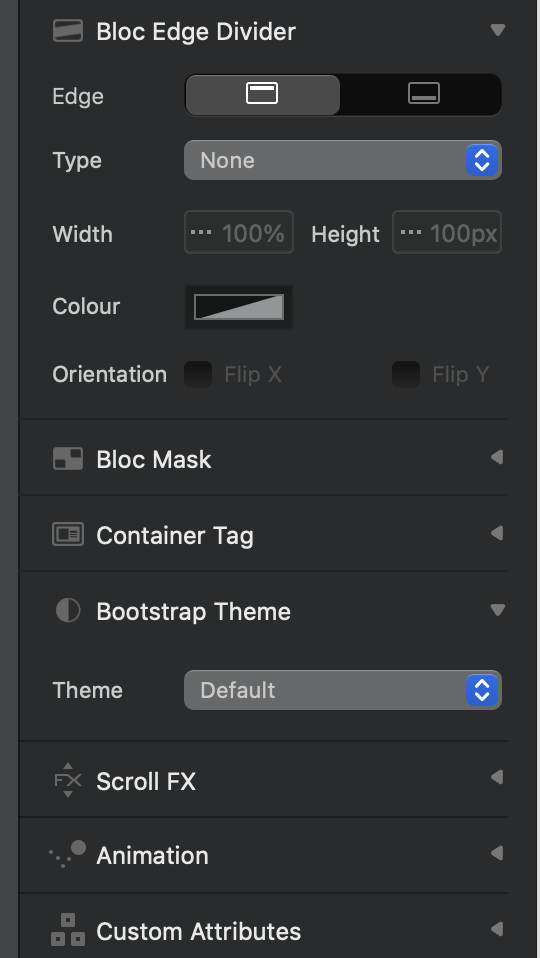
 . A new feature in 5.1 to change the nav dropdown links.