Actually, I’m not coming here out of the blue. I’ve been trying to adapt the code to Blocs for 2 weeks now, so my asking here is an attempt to get help to take me out of a dead end.
Jerry, appart from telling about your Caiman bank account and your wonderful skills as a rookie developper, I’m afraid you’ve been so far of very little help.
But I’m sure that beyond your sarcastic approach (that for sure is to conceal some touching shyness) you’re genuinely eager to share your knowledge and to patronise me in a much more efficient way.
Would you then propose me directions, Blocs specificities that should be considered ?
I got most of @PeteSharp guidelines, that are great (thanked be he), but so far led me to strange magnifying glass position on screen offset from mouse position and no magnifying effect.
Hello @PeteSharp
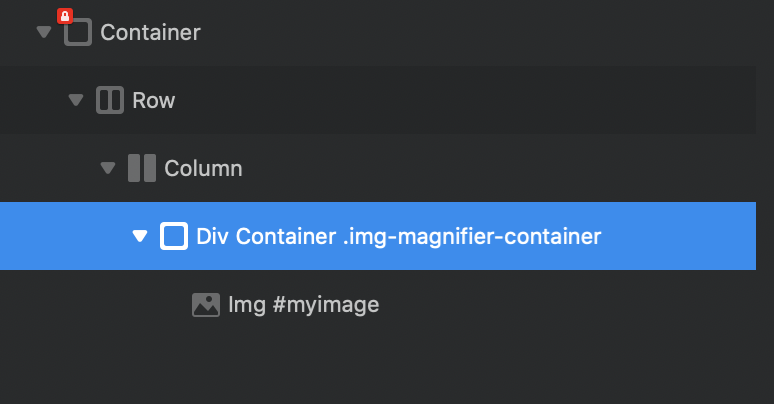
I got most of your guidelines to work. Code is where it should be, trigger function is added to page footer. I attached class and ID where it should be according to the original html code.
Preview shows mouse slightly left of magnifying glass circle and no magnifying effect.
I’m sorry to disturb you with all this but I’m a little new to Blocs and not a professional developper so my abilities are quite below what they should be to get out of it by myself. Thanks in advance, I’d be grateful for this.
@Jerry
There (thanks for coming back to me). and I tried several locations.
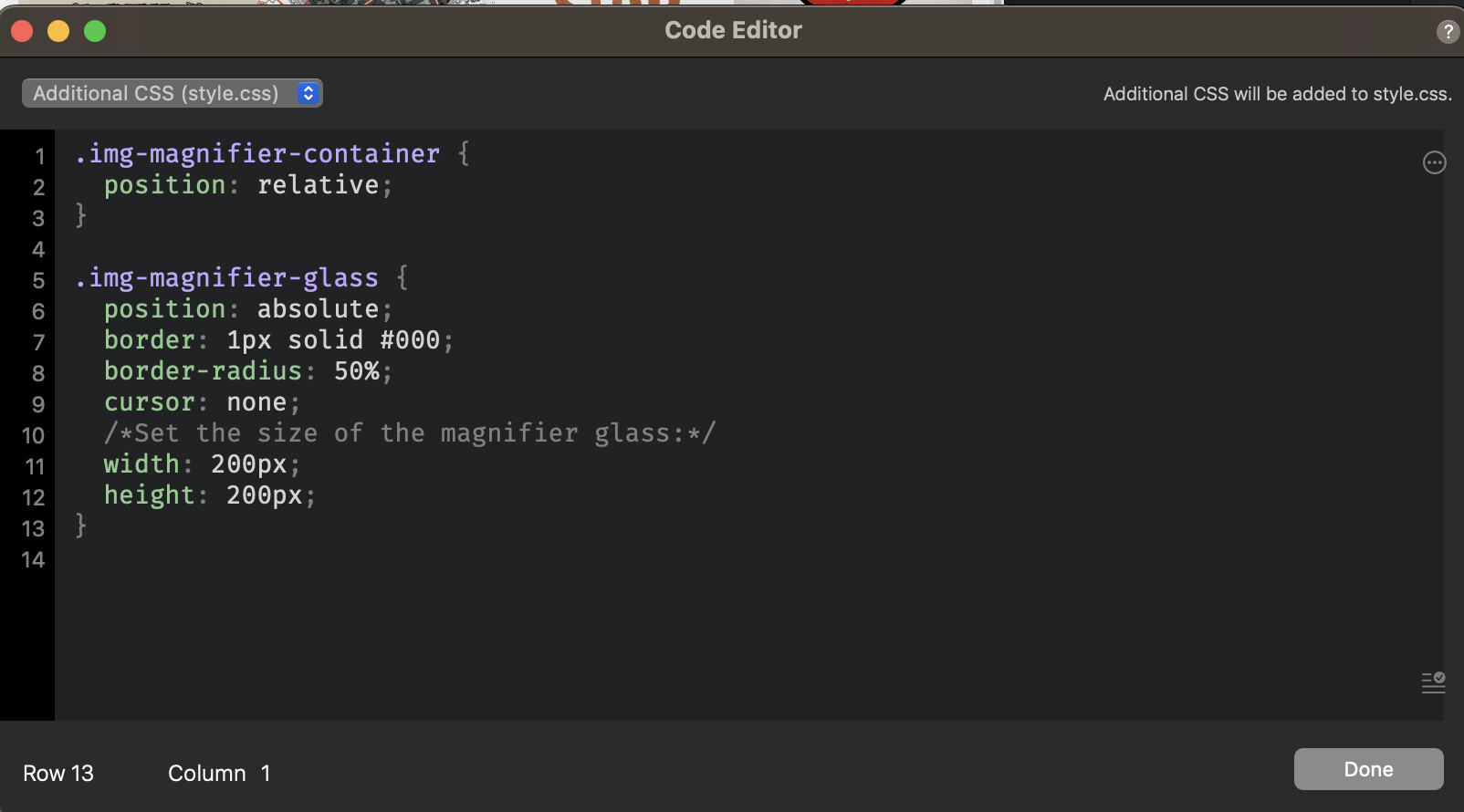
@Jerry I did. This is what I have in the Additional CSS
Here is what I did put into the page footer.
I understand there is a problem with getting the cursor x position but after many attempts, I couldn’t get the circle follow exactly the mouse
<script>
function magnify(imgID, zoom) {
  var img, glass, w, h, bw;
  img = document.getElementById(imgID);

  /* Create magnifier glass: */
  glass = document.createElement("DIV");
  glass.setAttribute("class", "img-magnifier-glass");

  /* Insert magnifier glass: */
  img.parentElement.insertBefore(glass, img);

  /* Set background properties for the magnifier glass: */
  glass.style.backgroundImage = "url('" + img.src + "')";
  glass.style.backgroundRepeat = "no-repeat";
  glass.style.backgroundSize = (img.width * zoom) + "px " + (img.height * zoom) + "px";
  bw = 3;
  w = glass.offsetWidth / 2;
  h = glass.offsetHeight / 2;

  /* Execute a function when someone moves the magnifier glass over the image: */
  glass.addEventListener("mousemove", moveMagnifier);
  img.addEventListener("mousemove", moveMagnifier);

  /*and also for touch screens:*/
  glass.addEventListener("touchmove", moveMagnifier);
  img.addEventListener("touchmove", moveMagnifier);
  function moveMagnifier(e) {
    var pos, x, y;
    /* Prevent any other actions that may occur when moving over the image */
    e.preventDefault();
    /* Get the cursor's x and y positions: */
    pos = getCursorPos(e);
    x = pos.x;
    y = pos.y;
    /* Prevent the magnifier glass from being positioned outside the image: */
    if (x > img.width - (w / zoom)) {x = img.width - (w / zoom); }
    if (x < w / zoom) {x = w / zoom;}
    if (y > img.height - (h / zoom)) {y = img.height - (h / zoom);}
    //if (y < h / zoom) {y = h / zoom;}
        if (y < h / zoom) {element = document.getElementByClassName('img-magnifier-glass'); element.remove();}
    /* Set the position of the magnifier glass: */
    glass.style.left = ((x+img.x) - w) + "px";
    glass.style.top = (y - h) + "px";
    /* Display what the magnifier glass "sees": */
    glass.style.backgroundPosition = "-" + ((x * zoom) - w + bw) + "px -" + ((y * zoom) - h + bw) + "px";
  }

  function getCursorPos(e) {
    var a, x = 0, y = 0;
    e = e || window.event;
    /* Get the x and y positions of the image: */
    a = img.getBoundingClientRect();
    /* Calculate the cursor's x and y coordinates, relative to the image: */
    x = e.pageX - a.left;
    y = e.pageY - a.top;
    /* Consider any page scrolling: */
    x = x - window.pageXOffset;
    y = y - window.pageYOffset;
    return {x : x, y : y};
  }
}
</script>

<script>
/* Initiate Magnify Function
with the id of the image, and the strength of the magnifier glass:*/
magnify("myimage", 3);
</script>
@Jerry
Thanks to your help, I managed to have the magnifier work 
Could you explain the [0] ?
There was a line set inactive as a comment that I reactivated :
//if (y < h / zoom) {y = h / zoom;}
I tried to add a test to make the magnifier hidden when mouse isn’t hovering on the image but it failed
/* Prevent the magnifier glass from being positioned outside the image: */
    if (x > img.width - (w / zoom)) {x = img.width - (w / zoom);}
    if (x < w / zoom) {x = w / zoom;}
    if (y > img.height - (h / zoom)) {y = img.height - (h / zoom);}
    if (y < h / zoom) {y = h / zoom;}
    if (y < h / zoom) {element = document.getElementsByClassName('img-magnifier-glass')[0]; element.remove();}

    /* hide magnifier glass if mouse outside the image:  */
    if ( (x > img.width - (w / zoom)) && (x < w / zoom) && (y < h / zoom) && (y > img.height - (h / zoom))) {element = document.getElementsByClassName('img-magnifier-glass').hidden[0] = false;}
    else
    {element = document.getElementsByClassName('img-magnifier-glass').hidden[0] = true;}
Also I tried to make it avaible to any image. I guess I’ll have to use getElementsByClassName instead of getElementsByID but my attempts are unfruitful so far.
Dear @Jerry,
Thanks for the [0] explanation. It helps a lot. That means this is used to allow any div with this class to benefit from the magnify function without the need of image ID ?
I managed to add the Mouseleave listener. But the Mouseenter seems not to work unless I made a syntax mistake when closing braces and brackets.
Here is my code :

Useful tool !
I scanned the MouseEnter code with it and it says it is ok
		img.addEventListener("mouseenter", function() {
			glass = document.createElement("DIV");
			glass.setAttribute("class", "img-magnifier-glass");
		});
@Jerry
I just did scan the code and the tool said it is fine 
function magnify(imgID, zoom) {
  var img, glass, w, h, bw;
  img = document.getElementById(imgID);

  /* Create magnifier glass: */
  img.addEventListener("mouseenter", function() {
   glass = document.createElement("DIV");
   glass.setAttribute("class", "img-magnifier-glass");
  });

  /* Insert magnifier glass: */
  img.parentElement.insertBefore(glass, img);

  /* Set background properties for the magnifier glass: */
  glass.style.backgroundImage = "url('" + img.src + "')";
  glass.style.backgroundRepeat = "no-repeat";
  glass.style.backgroundSize = (img.width * zoom) + "px " + (img.height * zoom) + "px";
  bw = 3;
  w = glass.offsetWidth / 2;
  h = glass.offsetHeight / 2;

  /* Execute a function when someone moves the magnifier glass over the image: */
  glass.addEventListener("mousemove", moveMagnifier);
  img.addEventListener("mousemove", moveMagnifier);

  /*and also for touch screens:*/
  glass.addEventListener("touchmove", moveMagnifier);
  img.addEventListener("touchmove", moveMagnifier);

  img.addEventListener("mouseleave", function() {
    if(glass) {
      glass.remove();
      glass = null;     }
  });

  function moveMagnifier(e) {
    var pos, x, y;
    /* Prevent any other actions that may occur when moving over the image */
    e.preventDefault();
    /* Get the cursor's x and y positions: */
    pos = getCursorPos(e);
    x = pos.x;
    y = pos.y;

    /* Prevent the magnifier glass from being positioned outside the image: */
    if (x > img.width - (w / zoom)) {x = img.width - (w / zoom);}
    if (x < w / zoom) {x = w / zoom;}
    if (y > img.height - (h / zoom)) {y = img.height - (h / zoom);}
    if (y < h / zoom) {y = h / zoom;}
    //if (y < h / zoom) {element = document.getElementsByClassName('img-magnifier-glass')[0]; element.remove();}

   /* Set the position of the magnifier glass: */
    glass.style.left = (x - w + img.offsetLeft) + "px";
    glass.style.top = (y - h + img.offsetTop) + "px";
    /* Display what the magnifier glass "sees": */
    glass.style.backgroundPosition = "-" + ((x * zoom) - w + bw) + "px -" + ((y * zoom) - h + bw) + "px";
  }

  function getCursorPos(e) {
    var a, x = 0, y = 0;
    e = e || window.event;
    /* Get the x and y positions of the image: */
    a = img.getBoundingClientRect();
    /* Calculate the cursor's x and y coordinates, relative to the image: */
    x = e.pageX - a.left;
    y = e.pageY - a.top;
    /* Consider any page scrolling: */
    x = x - window.pageXOffset;
    y = y - window.pageYOffset;
    return {x : x, y : y};
  }
}
@Jerry
Thanks you !
I told you I was terrible at coding
As for this part,
document.querySelectorAll('.img-zoom').forEach(imgElement => {
  new Magnifier(imgElement, 3);
});
I guess, that for every image that I need zoom to occur, I have to
- remove the myimage ID,
- give them img-zoom class
- change
magnify("myimage", 3);script tomagnify("img-zoom", 3);?
Dear @Jerry, I spent the last two days trying to implement your universal routine.
I looked through the code to understand what it does.
I got that the command …
img=document.querySelectorAll('.img-zoom').forEach(imgElement => {
  new Magnifier(imgElement, 3);
});
…looked for every image with the img-zoom class. As long as the code finds one, it runs a new Magnifier function.
So I tried to change the trigger function magnify("myimage", 3); to Magnifier('.img-zoom', 3);
I gave the image the class img-zoom
And I changed the
img = document.getElementById(imgID);
to
img = document.querySelectorAll('.img-zoom').forEach(imgElement => { new Magnifier(imgElement, 3); });
Unfortunately, nothing happened. I guess, your help is again needed for this last step.
Thanks a lot for having been helpful so far.
Oups,
“Universal routine” was for sure a typo (or merely a autocorrect wonderful suggestion).
Are you into the hotel/restaurant business ? I myself used to work as a writer for the Guide Michelin.
Seems our trades were connected back in the days.
You seem to have reach the coding heavens and I’m still on my way (a bit higher thanks to you but not enough to achieve this magnifying task).
Congrats !
Dear @jerry,
Would you grant me a last tip to at last being able to apply the zoom effect to every image with the right class ? Thanks in advance. Your lesson has being useful so far and my training with this matters is longing to be complete.
Dear @Jerry
I continued to study your piece of code and did find out some details :
document.querySelectorAll('.img-zoom').forEach(imgElement => {
  new Magnifier(imgElement, 3);
});
Javascript Validator tells me this suggesting your code is wrong
- Do not use ‘new’ for side effects.
- ‘Magnifier’ is not defined.
I can’t believe you let mistakes slip in. What do you think ?
My previous post has been reflagged. The post was not meant to be mean but just the expression of concerns, surprise about how I have been strangely welcomed on this forum and interrogation about some participant behaviour making me wonder why they were here if they wish not help (or doing it a very strange way).
I read my own posts, especially the first ones, trying to find out if something in my way to express my initial need could be considered as offensing to others. Actually I did :
- My demand may have sound as an order, I should have express the need for help, asking more politely
- I never took the time to introduce myself.
- When @Jerry wrote he had a solution, I assumed he was offering to share his file (things that are quite common in other forums), took this for granted and innocently asked for a file he wasn’t eager to share.
For all this, I apologise, even if I think that instead of irony and sarcasms, I would have preferred to be clearly warned from the start that my demand on this forum was a little brutal and uncourteous.