Not 100% sure I understand what you want it to do, but try adding this css in the header.
Change the #10A06F to any colour you want. I just made the rest of the borders transparent, so you will need to tweak it to suit your design.
.nav-tabs .nav-item.show .nav-link, .nav-tabs .nav-link.active {
	border-bottom: 3px solid !important;
	border-color: transparent transparent #10A06F!important;
}
.nav-tabs .nav-link:focus, .nav-tabs .nav-link:hover {
	border-bottom: 3px solid !important;
    border-color: transparent transparent #10A06F!important;
}
To space out the Tabs evenly apply the bootstrap class ‘nav-fill’ to the list
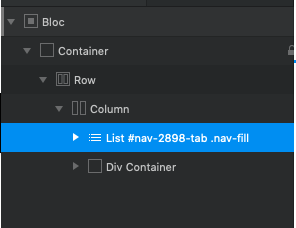
The unfortunate issue with trying to override some classes is you need to add ‘!important’ to the value or it doesn’t apply. Which the Class manager doesnt support at present. So you have the fun task of manually adding the styles.