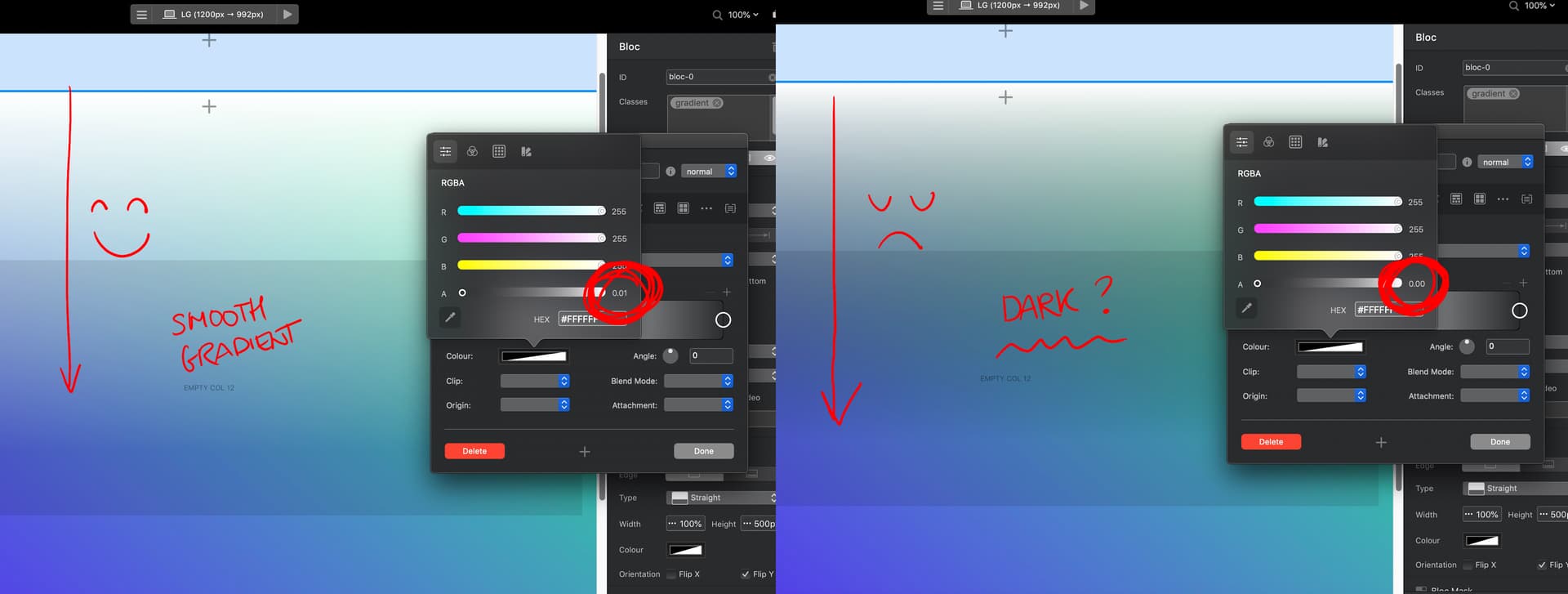
I have a quick question regarding creating a background gradient. I’d like to create a gradient that fills the entire browser background (100% browser width). I know how to achieve this with solid colors by applying them at the block level, but I’m struggling to implement it with a background image.
I’m looking for a complex gradient, similar to the one found in the testimonial section of this website (scroll down to see it).
What I like about the gradient in the example website is that it seems there are 3 gradient. A blue and green one that go horizontal and a third one which is white and goes from the top. Any idea how to add another gradient but from a different angle?
The only way I could think of adding another colour would be to add a box shadow to the top of the bloc with the gradient on.
So if you open your class that you have added the gradient to. Then go to the shadow tab and add a box shadow, put it on the inside and change angle to 180. Mess about with the distance and blur. Not the cleanest way but its something. Maybe a better way, I’m not sure.
Thank you guys so much for the help. I looked into the file Eldar shared. I also found his YouTube tutorial which was very helpful for learning about the class that was automatically generated to finetune the gradient of the edge divider.
One quirck I found is that if you make the gradient go from a color (white) to transparent, it doesnt look like you expect. It becomes too dark for some reason. I found a remedy for this problem. Make sure you first select the same color for both nodes (in this case both white) and then for one put the opacity not to 0.00 but to 0.01. For some reason it now looks correct