Over a year ago I started working on an idea to get Schema implemented in Blocs via custom brics. Sadly, I was not able to get it working properly. However, I had a partially working solution, so I continued working on this in the form of a Web Application.
As such, I’m able to introduce the Schema generator, which is a free-to-use tool for anyone and everyone building websites with Blocs.
Here’s why you should give it a go:
Boost your website’s SEO in seconds with structured data that helps Google understand your content better. This free tool generates ready-to-use Schema.org JSON-LD code for 25+ schema types—no coding required.
Simple 3-step workflow:
Select your schema type (Organization, LocalBusiness, Article, Recipe, etc.)
Fill in the form with your details
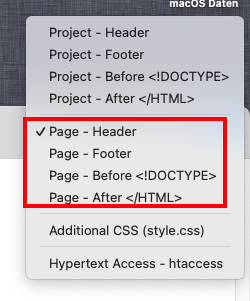
Copy the generated code and paste it directly into Blocs Page Settings → Header Code
The tool outputs complete code with proper script tags already included—just copy and paste into Blocs. Use the Global Area to add site-wide schemas like Organization or WebSite, or add page-specific schemas like Article or Product to individual pages.
Why structured data matters:
Schema markup helps search engines display rich results (star ratings, business info, event details, FAQs) in search results, improving your click-through rates and overall SEO performance.
Thank you both for those kind words. My hope is that all of our sites get ranked even better this way. And I’ll keep working on it, so any feedback is always welcome.
This is really amazing! It’s so easy to use. I tried it on a few of my websites in it worked perfectly. Thank you for doing this for our Blocs Community. Enjoy the Cup of Coffee. Casey
As always I have questions which are simple but ones which I would like to find out more if this is ok as what you have done, could be brilliant for myself and clients etc !
I am guessing this is all on a page by page addition to boost SEO per pages?
If it Is can do several pages, I am presuming they need to be different and not the same on say 2 or 3 pages as will google and other search engines reject it?
You said boots SEO in seconds - as in helps it straight away but will take a while to get crawled as normal? or does this get picked up straight away with changes on search engines?
Does this have an effect on current SEO for current pages and projects? Could the 2 conflict and cause high ranked pages/sites to drop - or do they work side by side and boost what we have?
I do a LOT of websites in the events sector - conferences, entertainment, awards nights, gala dinners etc etc - I guess services would be my main selection?
Do you have any links/examples to search where it will show the results of what you have done ?…or is it like hidden for search engines and just the page shows!?
Sorry for the questions !!!
Are there any videos your recommend showing the basics of Schema to get more understanding.
I’ll go over your questions one by one and add my reply.
I am guessing this is all on a page by page addition to boost SEO per pages?
Yes and no. This can be applied on a pagewide basis, but it can also be applied to specific elements within the page. The easiest (and safest) way to implement schema without prior experience / knowledge about it is to restrict it to pagewide schema, added to the header.
But to give an example, let’s say you have a onepager for a webdesign company. Then I would personally add the “Company” schema to the header, but you can also add FAQ schema to your schema section of the page or “Service” schema to the service-section of the page.
If it I can do several pages, I am presuming they need to be different and not the same on say 2 or 3 pages as will google and other search engines reject it?
This depends on the type. Schema for article, blog, books, … shouldn’t be reused and remain unique to the single page that displays that content. Schema like Company can be reused on multiple pages.
You said boots SEO in seconds - as in helps it straight away but will take a while to get crawled as normal? or does this get picked up straight away with changes on search engines?
The schema code is, when crawled, picked up quite fast. Once indexed, it’s almost immediately available for use by the search engine. And via things like search.google.com you can trigger an indexation to get it picked up even faster.
Does this have an effect on current SEO for current pages and projects? Could the 2 conflict and cause high ranked pages/sites to drop - or do they work side by side and boost what we have?
It is an additional factor taken into account for the ranking. So if your current page has no schema yet, it should definately boost the ranking. If it already has schema, it will depend if the search engine likes your new schema better than the old one.
I do a LOT of websites in the events sector - conferences, entertainment, awards nights, gala dinners etc etc - I guess services would be my main selection?
I already implemented “Event”, but I’ll look into adding the others for you too.
Do you have any links/examples to search where it will show the results of what you have done ?…or is it like hidden for search engines and just the page shows!?
The schema code (also called structured data) is visually hidden from the visitor and strictly there to help the search engines understand your content better.
For example, I added it to a customer’s site and if you now search for “montechiaro rental”, you’ll see montechiaro.eu as a card in the results and a summary of the page generated based on the structured data too:
I actually did early last year, but it didn’t generate valid schema, resulting in a bunch of issues in my Google Search Console I needed to manually fix (missing required items for example).
Thanks for the brilliant detailed reply and apologies for my spelling mistakes on my post (I have tried to amend them) I was in a rush as had to pic my youngest up from School and trying to get my email in quick !!!
And sorry to expand from what I have said , hope you do not mind !!!
So as it stands prior knowing about Schema - I would not have anything in for this from Native Blocs as it stands….so I am guessing none of my websites if I have not put this in, would NOT have it….so what you have done is a HUGE bonus for everyone.
I understand how to add this to the header of the page - but you have mentioned adding Schema to sections on a page? does this mean we can add 2 or more to a page to focus on certain elements of a page? - or have I got this wrong?….(to be fair, I will stick to a page to be fair)
I have heard of it, or seen it and to be honest just brushed it aside, but im guessing this is here to stay for a long time? or do you think its just something that is being used now…..but will be replaced with something else in the future?
I have looked at the wording you typed in on google for your results, I did not see anything to be fair, but I will try again tomorrow and see what happens! but looks GREAT!
Be great to see a video of this step by step - for all Blocs users to see.
Thanks again for your time - and sorry for more questions !!!
I have Google Site Verification meta data (generated through their site) in the header of my page/ project. Does the Schema data supersede that or is it advisable to use both? Also, does the snippet/ code order matter, if both can be used?


 Pro Tip: Add to the Global Area in Blocs to include the schema on all pages automatically. Go to Project Settings → Global Area → Add Custom Code.