I am surprised no one is mentioning PearCleaner. Is there good reason… ?
I am surprised no one is mentioning PearCleaner. Is there good reason… ?
I’ve not heard of “PearCleaner” probably because the name is too silly. What does that fruit have to do with cleaning?
At least with “AppCleaner” you can make logical sense of the naming scheme; which in my mind, speaks well of the people behind the product. With that said, it appears that the developer of AppCleaner needs to get on the ball and fix the app when running under Sequoia.
I overlooked testing PearCleaner and have now tested it by removing 4 apps.
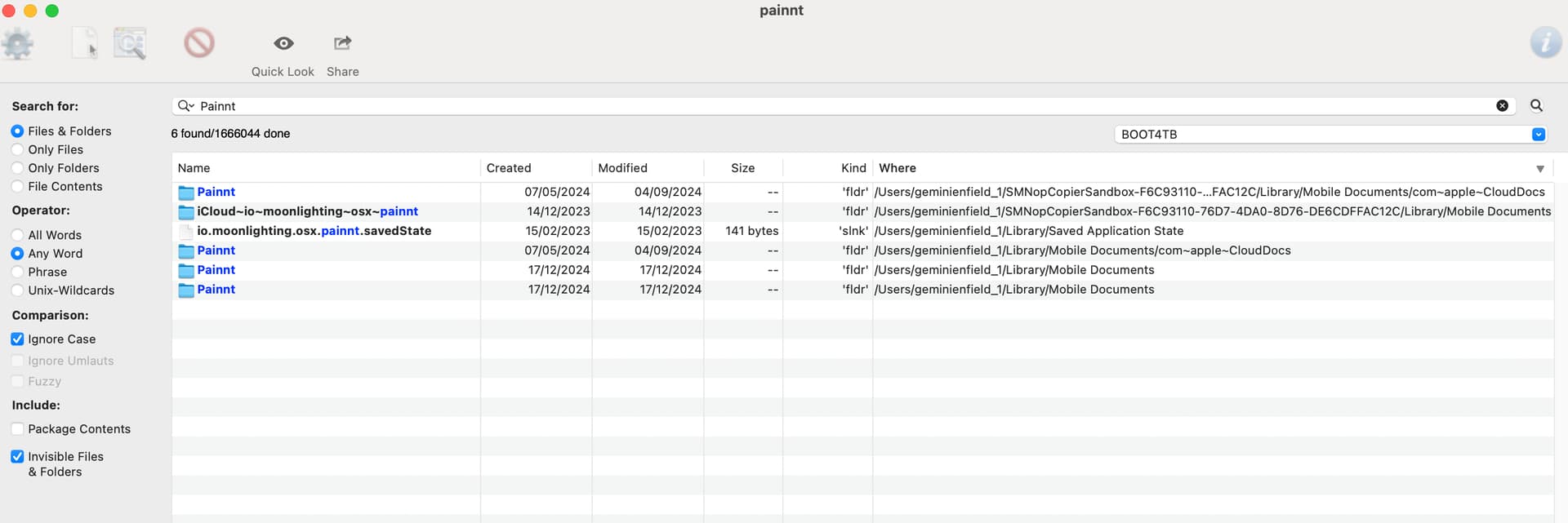
I’m currently searching the system for artefacts and so far haven’t found any.
Looks like this is the one for Sequoia users.
Thanks for that KBConcepts 
I will report back any issues.
UPDATE: Spoke too soon 
UPDATE 2: On further examination…
All but 1 of those folders are iCloud related, and the one remaining one had a single image I created with the app.
So I would say that PearCleaner did actually do a good job and that will be the app I use for now.
Hi again all,
When I used app cleaner years ago it removed other important files non related to what I was removing and caused issues.
I have been reading on Appcleaner in 2024/25 and pear cleaner and both still seem to have these issues at times.
Several forums have had some comments from apple employees simple say to just drag your app into the bin and this is apples best and most recommended way - we get no report on it, other than it goes.
The above is what I have been doing for many years and no problems…so why are we using App cleaners?
I simply drag it into the bin and then at times type in the product and remove anything associated to that name in the bin.
Seems to work for me!
I used almost all uninstaller mentioned and more recently TrashMe on the MacBook and CleanMyMac on the Mac mini.
As I switched to Setapp with a multi devices license, I kept only CleanMyMac on both devices.
it helps for the intestine transit 
(it is a joke)

not use them, beacuse sometime they remove the important files.
I have been using Appcleaner for many years. It is still the best app for deleting applications and their subfolders. I have never had any problems with things being deleted that were still needed by the system. Appcleaner shows exactly what is being deleted, so if I don’t want to delete something, I can uncheck it.
This one seems nice, IMHO. 
(Though I’ll probably pull up App Zapper out of habit.)