Hey everyone,
Happy to share the first beta of Blocs for Mac 6.3 
This exciting new version is packed with 30 new features to explore and test, some of them shown off last week here.
Happy testing 
Hey everyone,
Happy to share the first beta of Blocs for Mac 6.3
This exciting new version is packed with 30 new features to explore and test, some of them shown off last week here.
Happy testing
Just bumping this thread, don’t forget to test and file bugs if you encounter any 
Hey Norm,
Been testing the WordPress features specifically, created a few (mostly layoutless) themes (so purely testing functionality), but so far the Secondary menu has been working great.
Could you by any means clarify the following from the beta notes?
• Added WordPress styling to active marker on WordPress Loop Columns.
This I haven’t tested yet, but not sure what you meant with the “active marker”.
Of course 
Before it was hard to tell if a column was being used as part of a WordPress loop when it was selected.
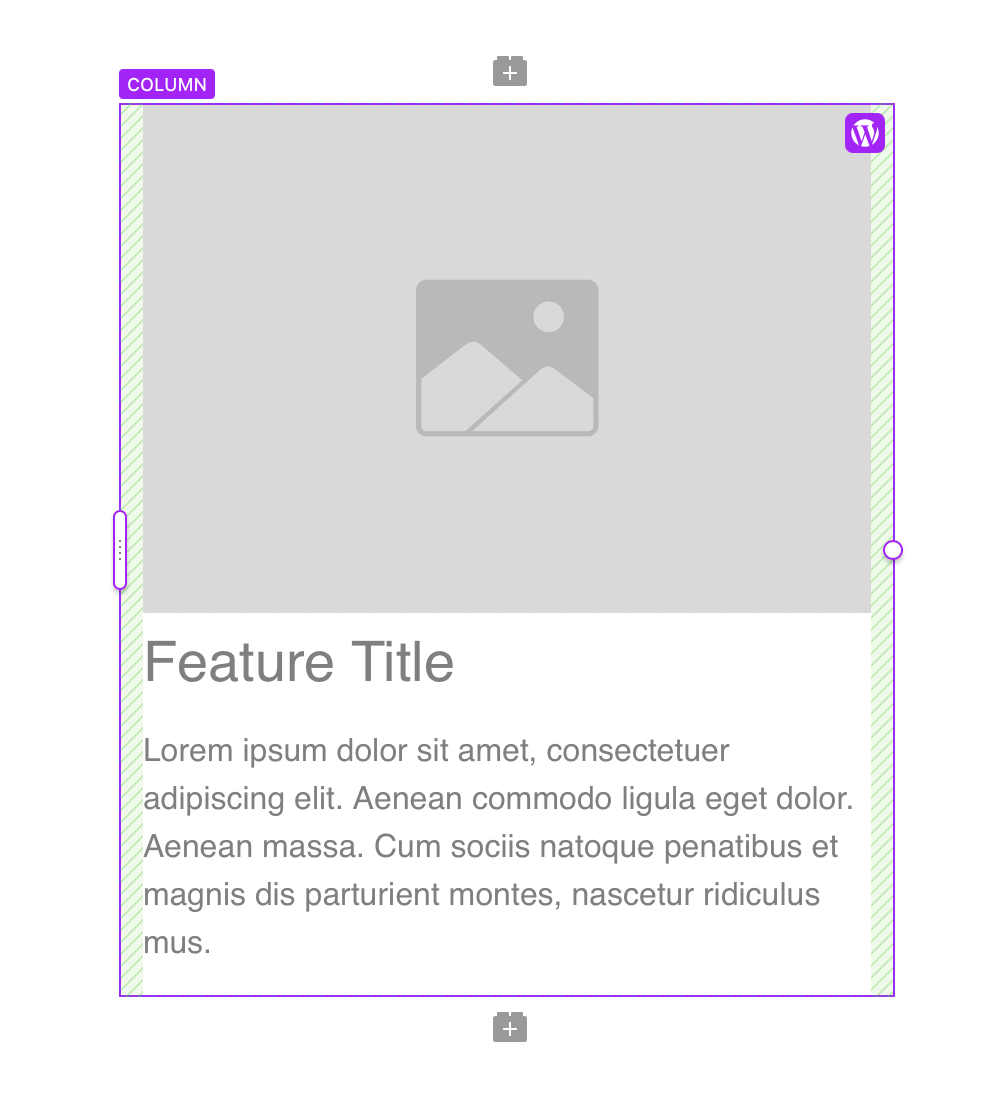
In Blocs 6.3 it’s a lot clearer now as the selection marker is purple and it has a little WordPress logo in the top right corner. Just a little UX touch
Ah I see. I was testing with a simple ‘WP content’ bric on the home page, hence I missed that. Great addition though. Will test this too 
Love it! Small but helpful feature, thx @Norm
@Norm Just had a chance to test out the find and replace feature and it worked great and found text as well as items I was looking for in code blocks. Woohoo and fabulous job! You just saved me so much time. 
Note that I didn’t actually use the replace feature as I’m one to manually update the text if needed (been burned by too many funky/flakey implementations in other apps).
Also one nit, and it could simply be my own project implementation as I have several code blocks that had HTML within. I noticed that going forward in search, it would take me through one of the code blocks, move out to more normal content where I’d replace things and at some point I’d return back to the code block again without looping back to the beginning. Going backwards in find was much more consistent, but like I said, it could have simply been the layout of my project that’s funky, but I figured it’s worth a mention so that you can keep an eye out for this.
I know many others are excited for many of the other features/improvements, but for me I’m now calling this the “Find and Replace” release. 
@Norm Did another search tonight and found a bug. It doesn’t look like search is looking in the Alt fields for images.
It’s not a bug, find and replace only searches textual content on the page. It doesn’t find data attributes and any matches in the actual code.
This makes sense except that alt text is textual content. Although not always used by sighted folks, alt text is very often used and can be the only content for folks who are blind or have low vision. So at least for me, I treat this as any other kind of text, just applied in a different spot.
Why do I care and how does this interact with my workflow? One of my third party tools does spellchecking and there was a word I typo’d that happened to be in an alt tag. Doing a search and replace didn’t work.
Totally understand, it’s just not supported in find and replace within Blocs as it’s not visible on the design canvas. Find and replaces works like find and replace in Pages, right now it’s just the visual text that is highlighted and scanned.
I’ll see if I can expand support for the underlying data attributes in the future.
Okay no worries. As there’s various intricacies here, maybe you can add a note to the docs within Search/Replace that speaks to what’s included/excluded to steer folks in the right direction?
Regardless, I’m still very much thrilled with the new Search and Replace as this is a huge improvement over what we previously had.