Hey everyone, I hope you had a nice break and are ready for some more testing.
Here is Blocs for Mac V5.2.1 Beta Build 2.
Have fun 
Hey everyone, I hope you had a nice break and are ready for some more testing.
Here is Blocs for Mac V5.2.1 Beta Build 2.
Have fun
Are you testing in a fresh project? Inserting your Bric during the session?
I am getting a double up on the class being applied to the element, I made a typo and then renamed the class correctly. So its adding .text-centre and .text-center

Also weirdly, since I am just adding a bootstrap utility class .text-center to a basic p element, I am not sure why mx-auto and text-lg-start has been added?
If I add another paragraph, it has no additional classes on it, as expected. Really random.
Q. Shouldn’t the classes be added to the element in the order they are placed in the classes input window? So you can stack your classes and over-ride as needed.
Which location are you running the beta from?
There are alignment controls for text, these manage the classes behind the scenes. Adding the classes manually is likely the problem here mainly because it’s text and has a visual tool for this task.
Yeah, I would rather add classes then mix side panel and class options. It’s much tidier for me. I haven’t had this issue before.
Also I noticed classes disappearing in the Classes input box and then coming back when clicking away and back to the element. I will try and see if I can pick up action that is causing it.
So something is up with the classes box.
We could almost do with an option to disable certain sections in the sidebar like spacing on text or padding on blocs to remove the risk of conflicts with custom classes. This could reduce troubleshooting and allow those who prefer custom classes to work in a more streamlined fashion.
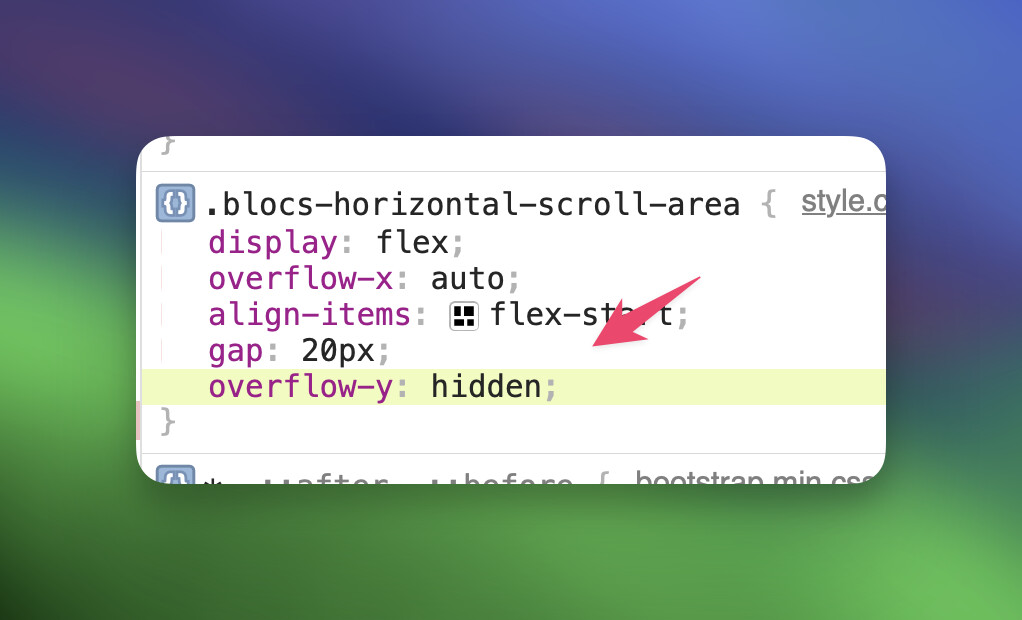
I think the horizontal scroller needs overflow-y: hidden added to stop this vertical shift happening in some cases… Obviously a padding issue, thats easily fixed with a slight tweak. But some users won’t know.
Example… this resolves it.
I hit a problem yesterday where some structured data added to the page footer was flagged by Google as being unparsable and when I checked it seemed to have collided with Volt in the footer. I’ve moved the structured data to the header to see if that solves it, but I’m waiting to see if anything is flagged on other pages where structured data remains in the footer. Clearly there should be some separation there.
The structured data in question has passed validation at the schema website, so it should have been OK.
As a follow up on my earlier post, placing the structured data in the header on that page has received approval from Google as no longer causing problems. I’ll wait to see if any other pages are flagged, but we should be able to add code in the page footer and have it remain separate from other things going on in the footer.
It’s a little cluttered and confusing at times when I click to search for blocs and a number appear that are already installed, yet then show up as also being available for sale. Would it not be possible hide them from appearing as store options if Blocs sees they are already installed? This happens with the gradient text hero blocs for example.