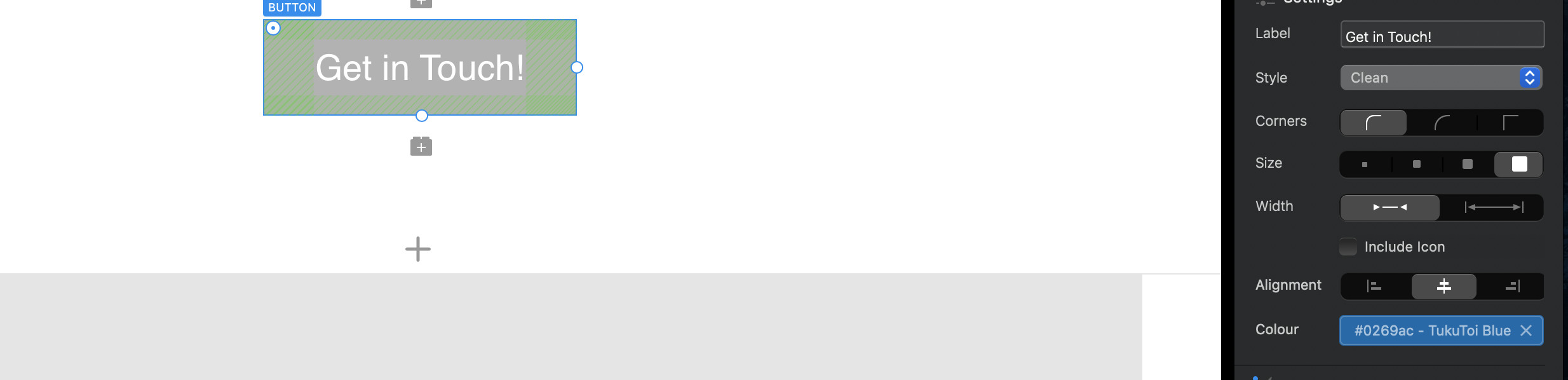
I was trying to add a button with custom colour.
I found that only if I select the “Wire” style setting then my colour is applied.
However in all other style settings the colour is not applied.
I am not sure if with colour here is meant the actual text colour or background colour of the button - but given it changes the colours in Wire more, I think at least the label should be affected by the setting in all cases, however it is not.
Is this expected, and would I have to add a custom class to do a custom background colour of the button or is it a bug?
Here a screenshot of the situation (not working situation).
Thanks for any input!
The colour should work with other button types as well when applied from the side panel and it does for me. As a general good practice though I would always apply button colours via a custom class. That way you also have options for hover and focus etc, plus font styling, sizes, gradients, radius and the rest.
1 Like
For me, it does not work.
While I get your point of using a Custom Class to enable all the other goodies, this does not resolve the issue which is - for me those settings do not work.
Perhaps it is something I do wrong, or something related to the OS version?
I tried to restart and all that, which did not really resolve anything.
Does it help if I sent the .bloc file for confirmation?
None of the buttons apply the colour styles, unless I use wire style preset.
I can of course edit the subclasses in the classmanager, but again, I refer solely to the setting, which for me does not work, not to the possibility to do it in other ways.
Thanks!
I would think any of us can look at the .bloc file to see if we have the same problem. That certainly sounds unusual.
Assuming this is not user error you would then be advised to send the project file along with a bug report so @Norm can take a look. Reporting Bugs – Blocs – User Documents
High Sierra may well start having issues if not already, but you should be fine with Mojave or newer. I have an old Mac Pro on Mojave and a new mini with Big Sur that work equally well. I know there were a few early issues with M1 machines, however those are rapidly being resolved.
Thanks, so I will ask there. I use latest BigSur. Certainly weird that it works for 2 of you and not me… perhaps it is some issue appearing only together with other settings?
Well, I will post to the help link you provided, thank you.
I’ve produced a lot of sites with Blocs and can’t recall having that issue. Might be worth your while just creating a fresh project with nothing but a button and then see if it still happens.
An afterthought, but very occasionally I’ll find something just isn’t working as expected and defies all logic, but if I remove the bric or bloc causing the problem and add it again everything mysteriously works as expected. It’s not something you can replicate or explain but just quicker to rip it out and add the element again, rather than lose time troubleshooting.
All this is rare and should work as expected but if you are finding something simple really isn’t working and there are no custom classes involved that can often be your quickest solution.
1 Like