Hi guys, I am trying to achieve a “remote” carrousel trigger.
I have this layout with a gallery bric and 3 images w/ dot indicators. I also have on the right 3 cards, and I would like to trigger each slide with a hover state.
I am trying with data-bs-carrousel and data-bs-slide-to but surely I am missing some other actions.
Also tried with custom actions but I can only go to next or previous slide, it would be perfect If I can go to a certan slide.
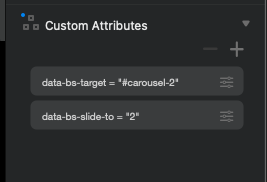
You need to use data-bs-target=“#mycarousel” with the data-bs-slide-to
Don’t forget the # with the ID.
Hi Pete! I am using the ID but I don’t know if I am using the right syntax’s:
name: data-bs-carrousel
value: #mycarrousel (the ID of my gallery)
name: data-bs-slide-to
value: 2 (the slide I want to trigger)
I also ignore how to trigger with a hover state.
The logic would be: on hover (missing code) call the carrousel (data-bs-carrousel) to the slide number 2 (data-bs-slide-to) for example.
Please read my reply again for the proper attribute name.
1 Like
Done!
But now How I tell to do that on hover?
You have to write some JavaScript to handle the hover triggering. The attributes require user interaction, which is built into Bootstrap.
Thanks! I am a designer so that would not happen 
I thought that I could use some attributes and it could work
1 Like