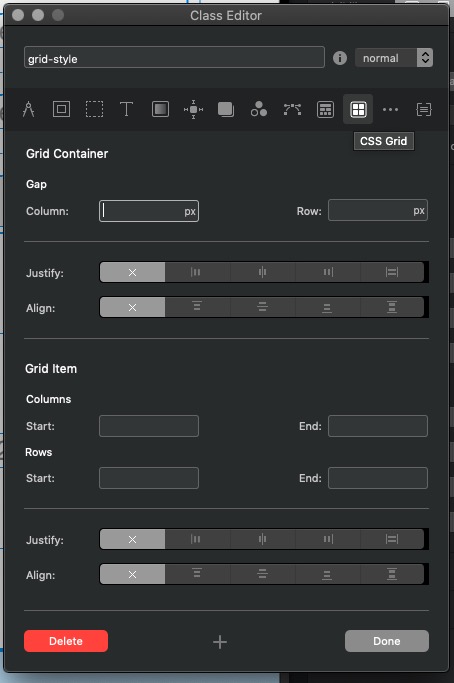
Btw yes you need to have at least one Bloc on page, which by default must contain a row and column. There is a good chance this may change going forward as we expand CSS Grid support and features over the year.
Yes you add a Bloc which contains a Container and a row, and then add a Grid Bric to access CSS Grid. This sounds confusing, and is a bit confusing, but just think of the Container, Column and Row as redundant, and treat the 3 of them as one Grid Container which CSS Grid needs. You can of course set the colum to be full width and remove all padding for an edge to edge grid. This is not an issue really and if that can change in the future it would make good sense.
On a plus side you dont actually need any additional Div Containers in the Grid as you can just add Brics and each will be treated as a Grid Item.
Part of the beauty of CSS Grid is that it can layout an entire web layout and contain Grids inside Grids inside Grids. Columns and rows are completely redundant.
Here is one of my RW templates that shows a whole page CSS Grid containing another grid. No columns or rows anywhere.
So I’m starting to learn. Some things i’ve discovered so far … please correct me if I’m wrong …
It seems that Blocs interface doesn’t really offer many options fro setting up grids… What I mean by that is it seems that I have to manually write a css tag for each and every cell in the grid, in order to position them correctly at different breakpoints. Compared to using traditional columns and rows, where I can go to a breakpoint, set the cell to span, 6 columns, offset it, etc … this all seems to be missing for grids.
Gives me the first cell in the second row. i had to do this for every cell in my grid. Also I had to set every cell’s display to “flex”, otherwise I got an error message when viewing in Chrome dev tools.
I am missing the “grid” setting in the display menu in Blocs … shouldn’t it be there?
Another thing that seems strange to me is when I add a gird bric, Blocs automatically adds a css tag “grid-style”. I can’t really see that this tag does/changes anything ???
Hi Norm, changing my scroll settings to the second item “when scrolling” solved the problem in Blocs, but it makes the rest of my OS hard to use, because the scrollbar only shows after I start scrolling. So I set it back to automatic …
Adding a Grid Bric already sets display: grid but it would make sense if Grid was show in that Display dropdown. It would also be handy to define any Div as Display Grid.
You then need to add a class to each item and then using that class use the Grid settings:
To setup each item. You also don’t need a Container as you can use the same class on any bric.
I have been bashing Norm’s ear over this, but setting an end position is the wrong way to do it. The normal way is to use a span instead of defining an end position. CSS Grids flow the content and if you define an end position, you break that flow. Spans whould be used IMHO.
I agree. Blocs needs a way to define the Col and Row templates for each Grid. The current implemnation is very very limited.
Thanks! I also agree that spans should be used instead of start/end. This would make it also feel a little bit like Bootstrap columns are set up in Blocs.
The option to define a start would still be required, but with a span instead of end.
Using end can also be confusing because if you have a 4 cols and you want the row to fill all 4 columns, you would normally use just span 4. Using start & end, then you would use start 1 end 5. However, the fifth column doesnt exist, so setting the row to end at a col that doesn’t exist adds confusion.
Norm, this would be a valuable addition to create a Grid from any containers that can function as a grid.
E.g. this would allow easy creation of layouts such as layers of content, i.e. layering text on top of an overlay ontop of an image. I.e. start 1, span 1 for each Item and adjust z-index to control the layers.
@norm You might want to consider adding support for …
minmax / min / max / calc / clamp / etc.,
… into a Blocs-ified UI approach for CSS Grid. These would allow for easy CSS Grid responsiveness without the need for media queries in many cases. Might be something to consider.