Double-byte characters, mysterious spaces, how to solve it?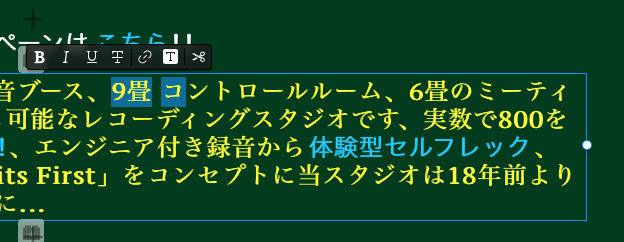
While I’m not exactly sure to understand the issue properly I suspect you mean „Mysterious spaces” added to text after copy paste it from somewhere to somewhere else (likely to blocs app)
That can happen due to a number of causes starting from badly encoded online or offline source, but also plain simple character encoding - try to paste that text into a code editor (something like sublime text or similar) that does NOT try to format your text. Check if you can find all the mysterious and/or unwanted characters and delete or rewrite them, then copy paste from there to the blocs app
This could resolve the issue. If not, we’ll need more precise details and steps to the issue in order to help you better
2 Likes
Used to have problems like this years ago when clients would send me Word docs for the copy. One of the main problems I had was that in certain scenarios absolutely nothing on the page would show on a PC browser!
So since then, whenever I get copy from a client, in whatever format, I always copy it to a TextEdit document, convert to plain text and copy out from there.
A few extra seconds, but saves my thinning hair for another day.
1 Like
Thank you for your comment, the problem is that information such as text links disappears when you copy and paste to another text editor, is this a problem with this, an OS problem, a localization problem? I’ve been feeling inconvenienced for some time
That’s just how unformatted copy pasting works, it will remove “hidden” stuff like links but as well the “mysterious” characters.
You can have either or, but not both, as far I know:
Either you copy formatted and keep things like Links and other formatting but risk to copy in some garbage, or, you copy clean and renounce to the formatting and links, but are sure to get raw data only.
A link should strictly speaking always be copied and then re-inserted as a link, you never know what you are copying when you do not see the actual URL, which is exactly what happens when you “blindly” copy in formatted text. Someone could be calling this a link to a serious page, and just copy pasting you’d not notice that it actually leads to https://a-dirty-url.com.
So as a rule of thumb you should “clean” your copy-paste and that will also remove the unwanted characters and spaces. It is simply safer, will cost a little more work, but avoid problems.
3 Likes
This is the first thing I do when I get different texts (doc, rtf, email, …) I copy them into a text file (clean them of all possible text styles). Add colored comments, then I will later know exactly where which text should be integrated into the website. I also write new texts/ ideas into this file, then I have all the texts together in a handy file, e.g. for later translations into other languages or for print documents to be created. For clean and problem-free work. 
1 Like
You can see this situation if you are setting up a link using “span”, but there is no other way to do a text link, isn’t it? It’s annoying to have to copy and paste and recreate the link. I wonder why this doesn’t improve, 4.12b3
Not so sure it’s. Blocs problem. I had it while using Freeway and Muse also.
1 Like