@Norm
I have two forms on a site, one is on the contact page and another on a multi select form. The one on the contact page successfully sends the form and is received. However the one which is a multi select form says it is sent but it it is never received.
I am using the same email address in both the Send to and From fields in both the contact page form and the multi select form (which is launched from a popup via a button) but only the contact page form works.
Here’s the url:
The muti select form is launched via a "Request a Free Taster Lesson” button which is on every page of the site.
Thanks for that @blocsuser but it doesn’t really help. I don’t understand why it should prove so difficult to use using the Blocs form brics. The origin site, built in Rapid Weaver and Stacks uses a stack called Super Forms which does the job perfectly with no issues. It’s a shame no one has written a Bloc/Brics for form building. I was so hoping to rebuild the site in Blocs but it looks like I might have to go back to Rapidweaver as a working form is essential.
Hiya… had a Quick Look at your source code for working & test sites.
in Safari its the right side of where you type URL (web address)
Its a circle with an i inside…
Working site contact appears to be using RW
Test is set up using blocs… all the CSS files appear to be there…
However… Style Sheets: (accessed via the text I added to the top)
I think you have a you have a reference to “call a CSS from the main site” (that appears to throw up an error - therefore it stops working)…
I’d look there for a start… as it may be its trying to source the RW content
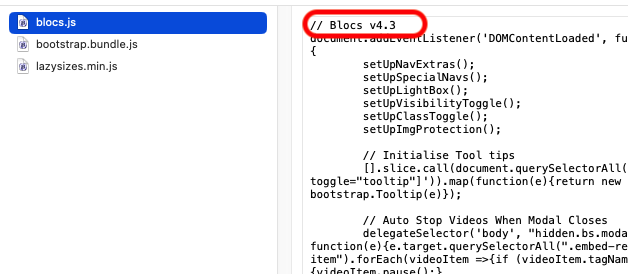
It notice your test site seems to be using Blocs v4.3. Trust your original @
Can help you stick with Blocs for this site. Hopefully it’s an easy resolve to get both forms working. Otherwise, have you checked with your hosting provider to see if they can detect any errors or issues within their logs?
When you export with the current BlocsApp version 6.2, v4.3 is listed as a comment at the top of the “blocs.js” header. However, it is not v4.3 but the current version.
Was also mistakenly under the impression jQuery dependency was removed all together within Blocs. So quickly viewing things within that url did not prove very useful from many aspects. :–)
Have now seen this regarding that false assumption.
That vanilla-fication still remains needed it seems.
Perhaps the update and versioning control needs addressed on many fronts for Blocs, could really assist with the apps ongoing bug tracking/fixing facilitation also. Very odd oversight that Blocs 6 exports thinks it’s Blocs v4.3 – how does such a basic oversight get passed basic internal testing / versioning.
Oops again, for the hastily evaluation of that url.
At the top of the script, there is a comment that says v4.3. That’s just a JS comment, nothing more.
Presumably, nothing has changed since 4.3 and the script is still OK, or the comment has not been updated.
Maybe we should get back to the topic at hand and keep things in perspective.
I’ll assuredly keep that in mind and note basic versioning is considered nonsense by yourself and others around here. As far as avoiding sidetracking your need for grandstanding me like that helped in this regard?
Sorry if you recently felt slighted here – no angst intended both there or here.