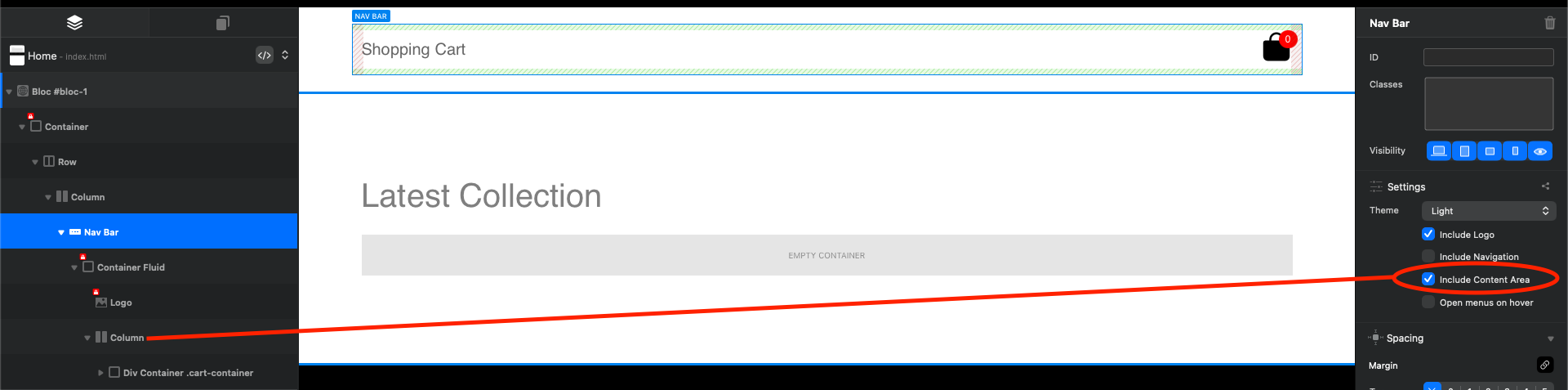
How did Norm add a new column object to an existing Nav Bar Bric?

I would have replied in the original post, but it was closed for no good reason.

However, in the demo project @Norm created, there is a new column added inside of a Nav Bar bric.

No matter how I try, whether by dragging from the layers explorer or trying to add via the bloc/bric plus sign buttons, I cannot get a new column object inside of a Nav Bar bric.

Does anyone know how this was done and what I’m missing?

You have to select the Nav Bar bric and check the option “include content area”. This will place a column apart from the navigation links

2 Likes

Awesome! Thank you. I wouldn’t have worked that out on my own.

I suggest you first check in Google Chrome as described if it’s a bug or not.

Why Chrome, rather than Safari or the WebKit Preview system built into Blocs? Are you getting paid to shill Google stuff? :wink: jk

I don’t care, just outside of blocs preview.

And Chrome, Edge or Brave browsers are still best for web developers.

2 Likes

… and Opera.
I know many Windows users use Firefox.
So you allways should check on this too because your Website could look very different on Firefox.
From previous experience.