I just published a new page on a clients site, and none of my images are showing, it just shows the alt tag description. I initially was using WEBP and thought maybe that was the issue but I changed them out for jpgs and it’s still doing. Needs some help figuring this out. Everything looks fine in edit and preview mode.
1 Like
In the site settings, turn off to export images as webp and then the images should show up on the website
1 Like
AVAILABILITY is mis-spelled in your menu.
I cannot see any pics.
Rich the Weather Guy
1 Like
I turned it off, but images still don’t load. All the other pages on the website are fine, it’s just this new page I created. This is frustrating, something as basic as displaying images should just work.
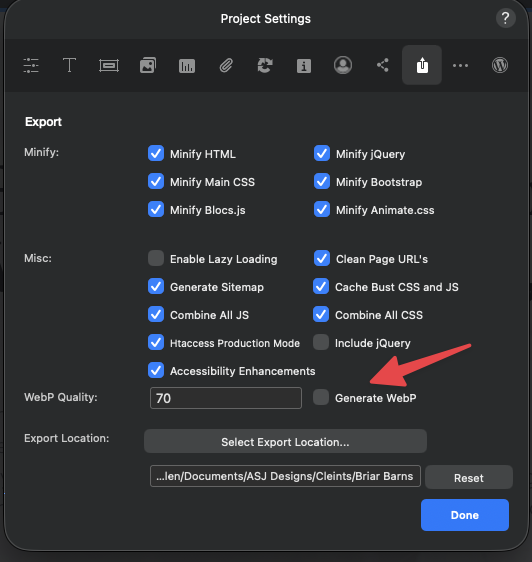

So does this mean they haven’t published correctly? @ajenks has a specified folder in his settings so you’d assume they should be there.
1 Like
Hey @ajenks sorry about the missing image issue.
I can see 6 are missing and it looks like (as @BLOCS-Freak mentioned) the paths are pointing the temp asset paths Blocs generates when a project is open.
There must be a reason these are not being reset during export/publish, do the assets show within Blocs correctly?
How did you replace these assets?
Projects with embedded assets create there temp asset links in the same location external drive assets are generated. It’s not an actual external drive, but well spotted, this should help us get this addressed a lot faster 
1 Like
Hi @Norm,
The images show show within Blocs correctly, both in edit and preview. I placed the assets by selecting the image from the image library within Blocs, I also tried draging the image from the asset library over to the image box. Both way’s result in same outcome
I’ve been using the “Publish” feature in Blocs to update the site, so I did an export to local folder then replaced all files using Transmit. Same issue persists.
Don’t know if this makes a difference but I’ve had this page in my Blocs project listed as “Do not publish”. I removed the “Do not publish” once I was ready to publish the page. It’s was in “Do not publish” status for a while, and I’ve made and published many changes to the site while the page was in that status.
1 Like
That may be the issue, I’ll investigate.
Could you please try doing this to one of the images that does not load.
• Delete the image Bric from the web page layout.
• Add a new fresh image Bric.
• Assign the image again to the new Bric.
• Publish.
I actually already tried something simalar. I added a whole new section to the page and put an image in it, then published. It didn’t display either.
Are you able to share a copy of your project file ?
Just messaged you the link
1 Like
Hey @ajenks,
I have found the issue, looks like the new Page Navigator had a little bug in it which meant it didn’t fully set the excluded pages back to be included when using the context menu option.
I have this fixed up and ready for the next beta release. 
In the meantime, you can fix your problematic page using the Page Settings option.
- Open Page Settings.
- Enable Exclude.
- Disable Exclude.
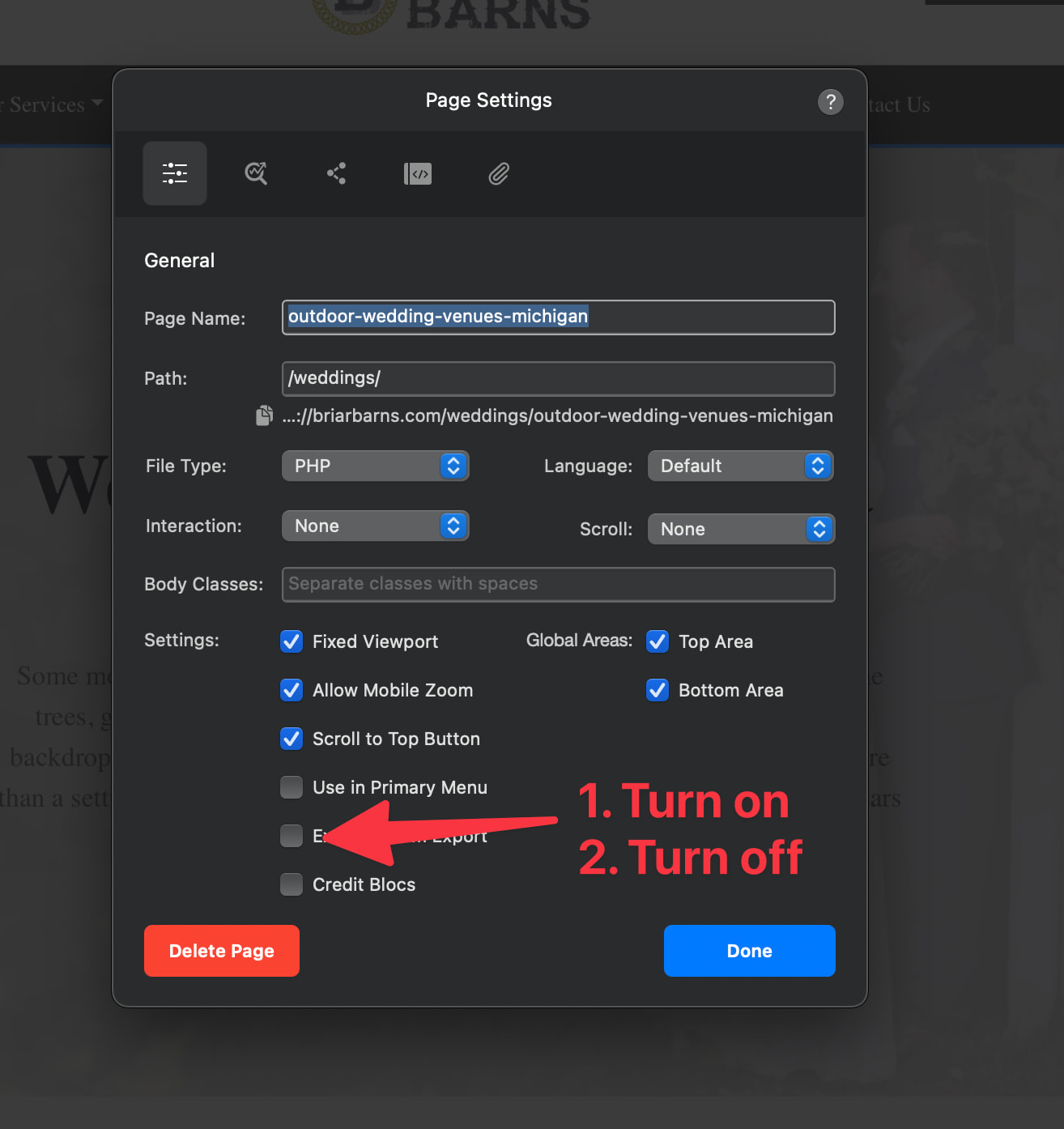
That will correct the issue and you should find the images work after publish.
Thanks again for your help on the matter.
4 Likes
@Norm thank you for looking into this, that did the trick and my images are now showing up.
2 Likes