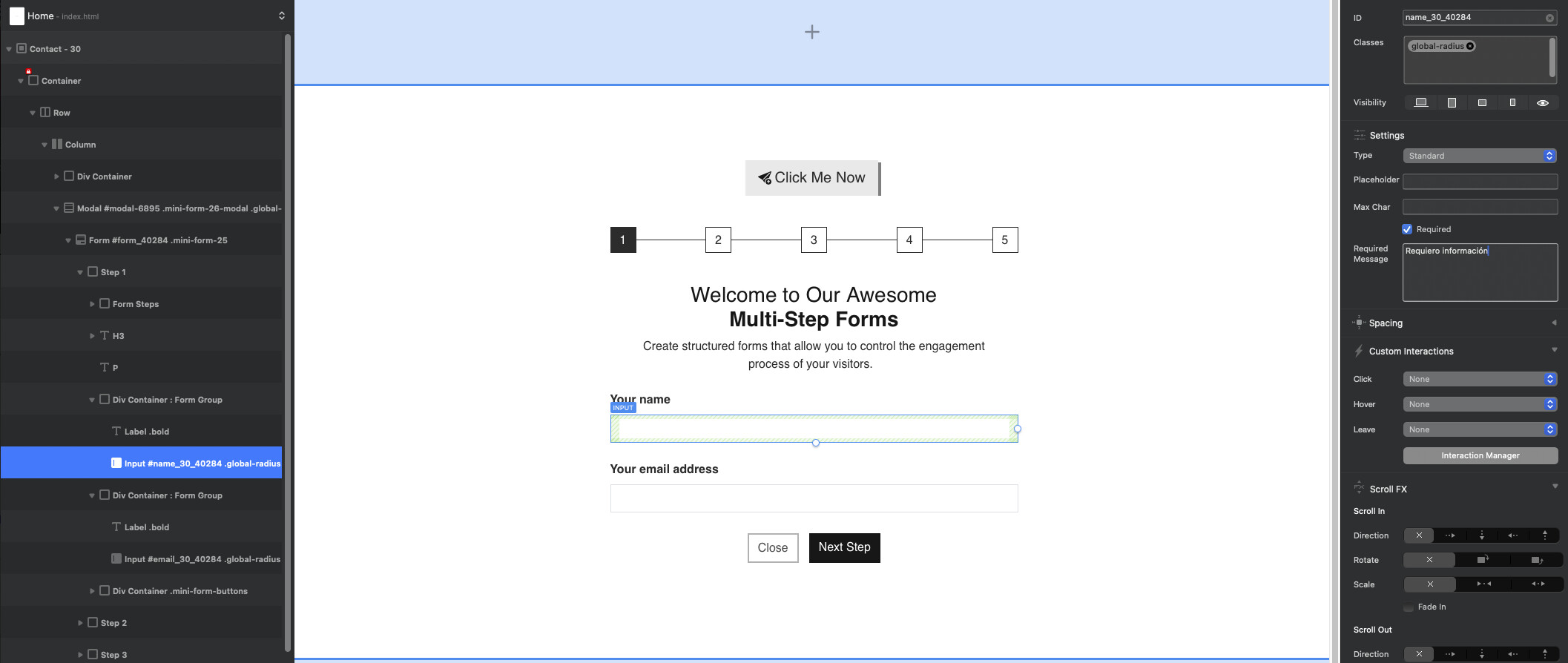
I’m configuring “Multi-Step Forms /Settings option: Required” because I changed the form from “Self Hosted” to “Custom” since I require the Method: POST and Action: /registro. Everything is fine up to this point.
However, when I go to the form’s input and in Settings I want to enable the “Required” option and display a message that the field must be filled in or it won’t proceed to the next step, the message isn’t appearing. I need your help. When I enable the “Required” option, the warning or alert message isn’t displayed in the form.
I need this for a record that I’ll use with the POST request to inject the information into a MonDB database.
You can use javascript, which is triggered each time you press the next step button to check all required fields are valid, or you can disable the next step button until all required inputs in that step are complete. You would also want to disable the step index at the top if it links to each step until validated also.
There are tons of example of how to create this online, or copy the HTML of your finished form into ChatGPT and ask it to write the javascript for you
From memory Blocs isn’t using the Bootstrap validation, but I find it a lot nicer and implement this in my forms with Bootstrap sites.
This is a front end validation method anyway. Which is fine for most cases.
I’m very impressed with your rapid output these days! You’ve quickly become one of the top third-party developers for Blocs, and I highly recommend you to all my customers!
@Boss81 I take it you haven’t released your one yet?
Go for it, it will be helpful for people to be able to make proper multistep forms, and put required fields in logical groupings, much better user experience. (I won’t finish mine)
If you need some more help building your brics, drop me an email. Expect this week, I am moving house
I made this specifically for @Eldar multi-step forms, but if necessary, it can be done differently, but since there is no such thing among the built-in forms of blocs, I didn’t make it for that.