I’m excited to announce the release of our new Bric: QuickHover!
QuickHover lets you add gorgeous CSS hover effects to any element on your Blocs site. No coding required. Whether you want smooth underlines for your navbar, modern fill animations on buttons, lift effects on cards, neon glows, or creative transforms, QuickHover makes it incredibly easy.
What’s inside:
53 carefully designed hover effects across 7 categories (Fills, Underlines, Borders, Glows, Transforms, Gradients, Misc)
Full customization of colors, timing, sizing, and easing
Two easy ways to apply effects: Class Injector or List Selector mode
Built-in “Disable on Mobile” option
Pure CSS – super lightweight and fast
Works perfectly with Global Areas
It’s one of those Brics that instantly makes your website feel more professional and alive. Once you start using it, you’ll wonder how you lived without it.
Price: Just $19 (one-time)
What you get:
The QuickHover Bric
Full 12-page detailed user manual
Demo Blocs file with working examples
To learn more about Quickhover, purchase or read the manual prior purchasing visit our website:
the Initial Setup instructions refer to RichForms - looks like a copied instruction from other product
I didn’t find it clear that if you put a QuickHover Bric in a global area it can be used on all elements on all pages. I wasn’t sure if this bit only applied to items in the header, so experimented: “It can be placed in the Top Global Area (to affect the navbar or site-wide elements)”
Good catch! Indeed, I use a template for the “setup” part as it’s for all Brics the same. . This ‘bug’ () has been fixed and you can download the updated version here.
Yeah ! As soon as I saw the QuickHover brick, I bought it.
It is a few years that I see these effects on some website. I looked into tutorials such as CSS-tricks website and I did it once on a website. But to have all these effects ready in a brick, great ! Thanks.
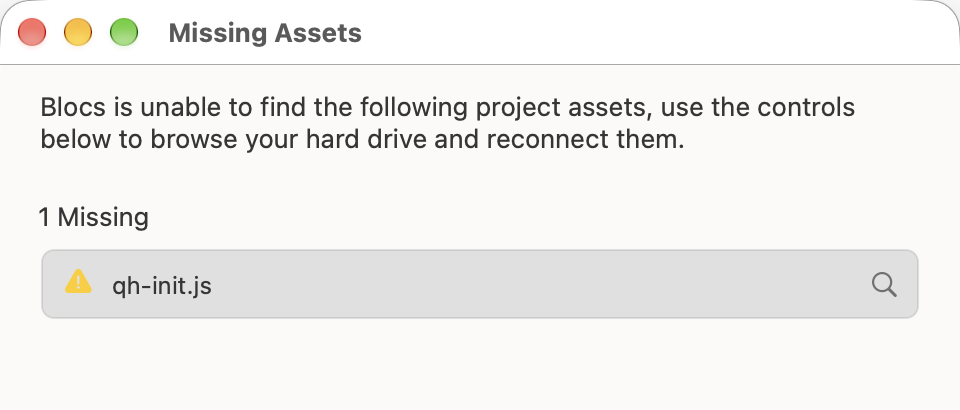
When I open the demo project, I have a missing alert for qh-init.js.
Moreover, the link you posted for the updated version still as the RichForms mentioned in the doc.
Thanks @svimic, glad you like QuickHover!
The qh-init.js warning comes from a leftover entry in the demo project and doesn’t affect QuickHover at all. To get rid of it:
Close the Missing Assets dialog.
Open the Asset Manager, right-click qh-init.js and delete it.
 . Whether you want smooth underlines for your navbar, modern fill animations on buttons, lift effects on cards, neon glows, or creative transforms, QuickHover makes it incredibly easy.

 . This ‘bug’ (
 ) has been fixed and you can download the updated version