In that case, you too are being unreasonable in that Jannis suggested Norm create an entire OS. (Jannis Quote: “Blocs should create its own operating system.”) That is NOT reasonable. It’s a statement rooted in emotion with the intent to argue. And reading further into what he could of meant is something I do not do because I prefer clear speech.
As to my OS, such is irrelevant because @KBConcepts has a supported OS and the same problem. Therefore, my bug report to Norm is relevant due to that.
The fact remains that almost none of the discussion in this thread outside myself and KBConcepts is in any way encouraging or helpful. It basically is talk that treats the problem flippantly or negatively. Such basically says, “I don’t have the problem, so I shall therefore discount the importance of your problem.” I’ve seen that happen for YEARS in many forums, and I personally cannot understand it.
I am merely stating facts. So is KBConcepts. We stated the problem and that it persists across a reboot, and since KBConcepts has a support OS, I filed a bug report. That should settle the matter until Norm chimes in.
@KBConcepts
Since no one else here in this thread seems willing to be empathetic or specific with regard to potential step-by-step solutions, I just tried several more things to see what would happen. We know that a simple reboot doesn’t work, but I just discovered that the following combination does work on MacOS High Sierra, and it might on your newer OS too.
Please try these steps:
Open a Finder window and click on your Home folder in the left sidebar, then dig down into this folder: home > Library > Preferences
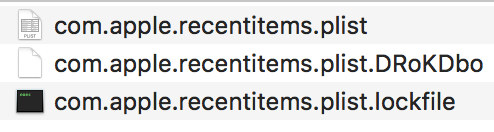
Trash all the “recentitems” plist files (but don’t empty trash). On my computer, I had these 3:
Shutdown your computer (do not Reboot!)
Press the Power button and then quickly press and hold (for 20 seconds): Option-Command-P-R
That resets NVRAM. Holding those keys for 20 seconds will let you hear two boot chimes that will sound different from the normal boot chime (smaller/softer?) After 20 seconds, release and let your Mac boot normally.
Launch Blocs. Most or all of your recent docs will be wiped, but open one, then close it, then open a different one, then close it, then do a third. Are your recent docs being populated now? Mine were.
Summary: (1) delete the “recentitems” PLIST files and (2) reset NVRAM.
If this works for you, then this thread perhaps can serve as the go-to solution for others who have the same problem with No Recent Files.
Well done @JDW - I don’t have this issue but been following the posts and know how frustrating it can be to get things solved and hanging on waiting for advice & help from the blocs team.
Fingers crossed I don’t get this issue when I change my macs etc - but your post above will help those that do. Fingers crossed this works for @KBConcepts and fixes the same issue.