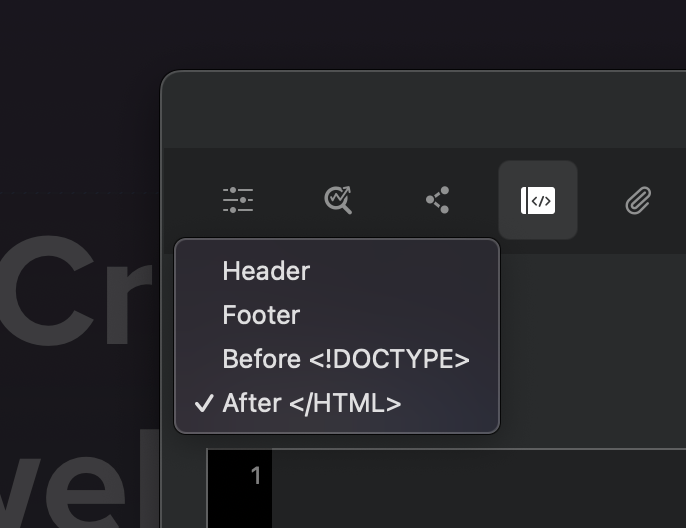
I don’t know if others have run into this, but a while ago I had squirreled away some modal JS code onto one of my pages. I’ve recently removed the modal but the code kept being exported and I had a heck of time tracking it down.
In the end, although I had looked in Page Settings » Code, numerous times and had dropped down the popup menu many a time, I didn’t remember that Blocs had other items beyond the listings of:
Header
Footer
Before
On a lark, I had clicked the overlapping rectangle button in this part of the dialog, Open code editor, and then immediately found the injection point I was looking for as there are a ton more:
Project - Header
Project - Footer
Project - Before ‹!DOCTYPE>
Project - After
Page - Header
Page - Footer
Page - Before
Page - After
Additional CSS (style.css)
Hypertext Access - htaccess
Just mentioning this in case someone else is in a similar predicament down the road.
@Norm This might be something to make a bit more clear in the UI as well. Maybe show all the injection points in the popup menu, change the Open code editor button and location, or provide some kind of hint/label that there’s more hiding behind the scenes.
Hey @PatrickSalo thanks for the feedback, this has also been a problem I’ve personally encountered many times, especially when troubleshooting bug reports, only to find the problem is caused by pasted in code in one of the supported code zones.
In Blocs for Mac 6.3 beta 2 (coming next week) I have added a new feature that will display a little code button on the layer tree (page dropdown), which indicates if the page is using additional code from a code zone.
When you click the button you get a list of all code zones that this page will include code from. One click and you are in the Code Editor with that zone selected.
Page Settings Code Input
I wouldn’t add all of the code zones to the Page Settings options as some of the zones are global and affect all pages. However, I did notice the Page - After </html> zone is missing from Page Settings, so I’ll also get that added to the zone dropdown in build 2 as well.
Woohoo and I guess glad to hear that I wasn’t the only one with this issue. This looks to be yet another huge improvement for version 6.3 and many thanks for adding this in.