How do you change the permalinks in blocs? E.g; it should say website/home instead of website/home.html.
1 Like
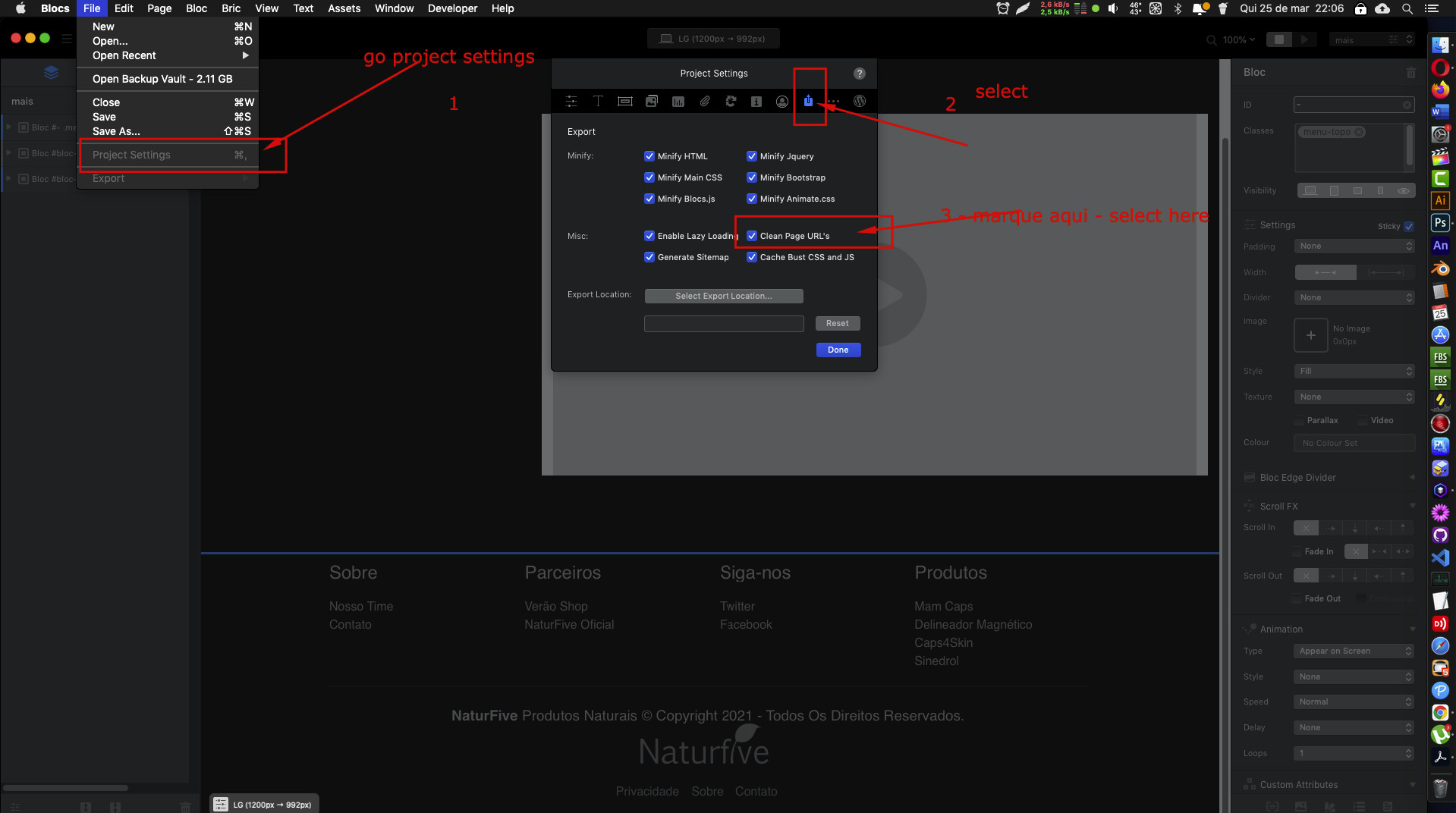
There is an option in Project Settings.
Select the Export tab (Looks like a square with an up arrow)
Then tick Clean Page URL’s
4 Likes
Hi Pete, I tried this and exported the project. I noticed that the individual page html files are put in their own individual folders. When I open the project locally in the browser, clicking on some pages via the navigation bar causes the folder windows to open instead of displaying the page. Seems like some sort of a file access path issue. Is there something that I am doing wrong?
In that case you’re not able to open them just locally from Finder. Either preview inside Blocs, or use an local server environment like http://MAMP.info
1 Like
Thank you for that useful information. However, even after loading the poject to my host providers server via the c panel, some pages work and some don’t. Without the ‘Clean Page URLs’ selected, it works perfectly.
However, let me try again…
Thank you Pete, Gleiton and Jannis, tried it again and now it is working perfectly.
1 Like