SFTP is kind of half implemented here. I had this issue with MacOS and now with Linux VPS. I need to be able to browse and see the whole root directory so I can point the software to store site files at specific places. Rapidweaver has no issues with this so I would expect the same behavior once I log in as root.

Not sure what you’re asking, but if you logged in as root, that’s the home directory of root, usually /root.
If you specify just /, you should see the full filesystem.
I would not recommend logging in as root though. I use my own user, and make sure to add a directory as document root where both the web server user (apache or www or what your setup uses) has read access and my user has write access … (If you need upload from web app, or use f.ex. VoltCMS, the web server user must have write access.)
Usually you set the start (drop-in) directory at your host for your SFTP account.
Are you entering in a sub directory, if so how many levels deep?
This is exactly what is happening. Login as root gets me just root home directory not the whole drive, but specifying /var/www/clients/ and so on does not get me to where I want to be. Rapidweaver like I said works fine so there is something in Blocs that is not doing as it is supposed to when managing SFTPs.
yes, directory is specified /var/www/clients/… and so on.
I agree, created a separate user for this and still the same issue - Blocs cannot see the right folders, where RW works perfectly fine. This confirms it is some kind of Blocs limitation
Blocs only shows you folder inside the users home directory when you opt to select folder?
Try making a symlink from the user’s home directory to the server folder you want to jump to.
(In the home folder: ln -s /path/to/www_docs link-to-www_docs)
@Norm well, lets fix the behavior instead of complicating it further.
I did a quick test, didn’t seem like the select folder browser would follow symlink.
Also, since the same select folder GUI in Blocs reports as “Server Root” what’s just the user’s root, something should probably be changed.
It’s not unheard of that for (S)FTP clients, the directory spefication is relative to the user’s home directory, but unless stated otherwise in the GUI, it would make more sense if /meant Server Root directory, IMHO …
That said, I don’t use the Blocs FTP too much. For my main sites, I use Forklift and it’s sync folder functionality.
well, there are a lot of ways to do it. I also love Forklift and use it but this is one unnecessarily step when we have publish inside the app.
So when you browse the server from the root, you are not seeing child directories in the first level?
Blocs supports this, so I’m wondering if some kind of server setup is preventing those child directories from showing in Blocs.
I just tested this.
On my own dedicated server, I logged in via SFTP using the “root” username, the password, and the “/” directory. However, I end up in the “/root” directory instead of the “/” directory, and I can’t get out of there.
For a regular user—that is, not “root”—it’s fine if they remain confined to their home directory. The “root” user, however, should be allowed to switch to other directories. That’s why they’re “root”, after all.
Whether it makes sense to log in as “root” is another question.
The permissions and ownership of the uploaded files will then also belong to “root.” So you have to use “chmod” afterward to adjust the permissions; otherwise, the user will have files in their directory that they can no longer modify. We’ve done this for special cases as well, though we used a “sh” script and adjusted the permissions afterward.
So that behavior is more of a fundamental issue. Using the same data, I can switch directories in other programs (e.g., Transmit).
Server: Debian 12.14
FTP: proftpd
I agree that publishing within Blocs is neat. But for my most active projects I find Forklift’s syncing to be superb … 
I was testing against an SSH account on a shared hosting server, running CloudLinux and DirectAdmin. Using CLI/in bash, I can navigate and see /var/www and what not.
Navigating the folder in Blocs, it says “Server Root”, while clearly being my user’s $HOME:
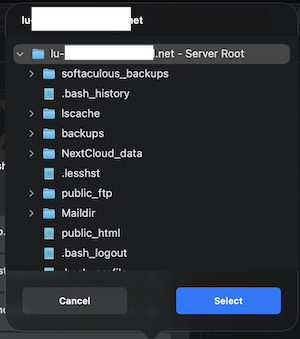
Let me know if you need more info/testing/debugging …
1 Like
I just hope this will be added to the next patch update fixes as having to manually push 40 changes per day is absurd to use something external.