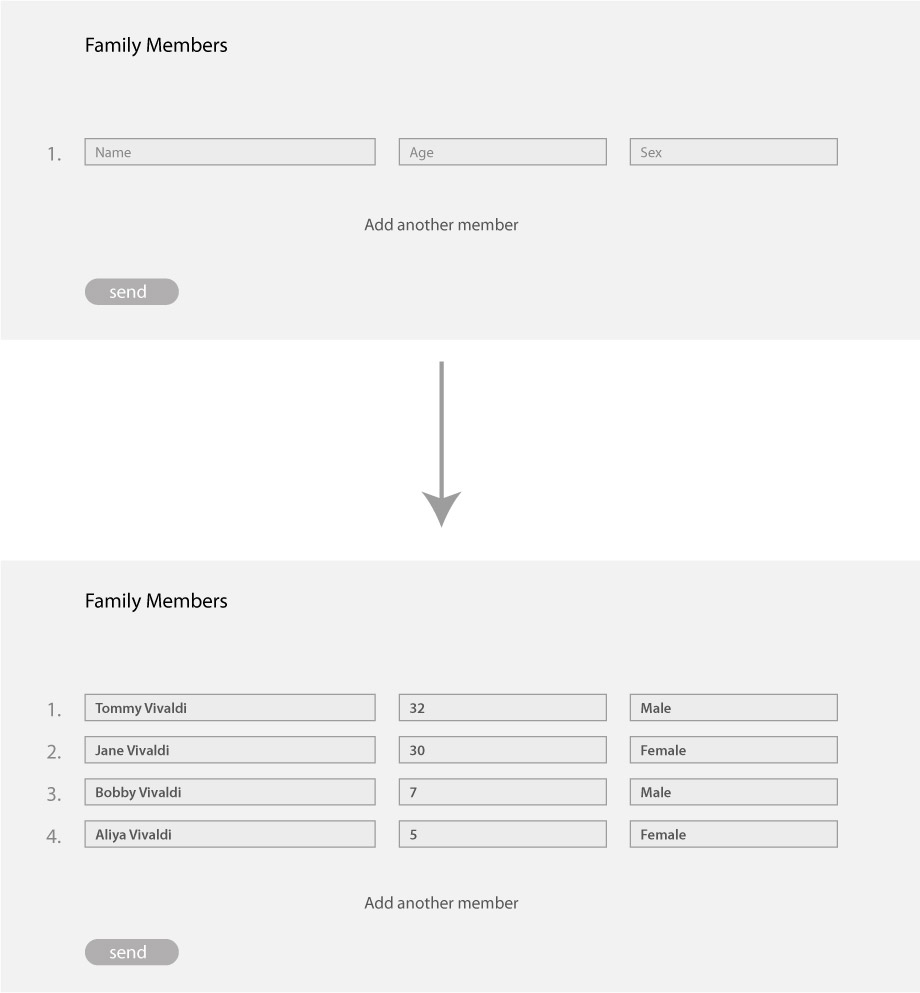
I need a simple but dynamic form. Let me explain by example. Let say an insurance firm needs you to list all the members of your family where each member is defined by 3 fields (Name, Sex, Age). The 3 fields would be oriented horizontally and if you want to add a new member you can press a small + button to add a new set of fields for a new family member or press a - button to subtract a set of fields (member) that you do not want to list.
It is possible, there are a couple of things you need to do to make this work.
The JavaScript for adding and removing the fields and also the form handler needs to be written in PHP to email the form data.
The only method I know of (used in the past), is to store all those dynamic fields into a single array to parse to the form handler.
I’m not going to build it for you, but it heads you in the right direction.
@PeteSharp and @Jerry - Thank you for your kind input and willingness to help, much appreciated.
As I am not a coder, I think I need to keep this as simple and functional as possible. Maybe the dynamic aspect is not necessary, I’m going to try and build a form that has 15 sets of fields for 15 people. Hence, users would just fill-in the form depending on the number of people in their family. Blanc fields can just remain blank as long as the information in the populated fields are submitted successfully.
Is there a way to do the following:-
In the case where ‘Name’, ‘Sex’ and ‘Age’ is required for each person, is there a way to prompt the completion of the fields per person?. Example: if a name field is populated then the sex and age fields become mandatory to populate.
Is there an easy way to filter out the blanc fields when the ‘Send’ button is hit?
Hi @Samazar , I know a few people who have needed multi step forms for business information they needed to collect, they used Easyforms as this opened the door for more creative forms and true data caputuring.
How does one embed the form? - Is it a matter of copying the code and pasting it in the header or footer of the page. Is it possible to save it as a bric?
Thanks @AdieJAM, actually I’ve just realised that there is no need for a subtract button. I would indicate just one set of fields (Name, Sex, Age) and the user should be able to add additional sets of field if needed - just like in the reference she provided by @Jerry.