Hallo zusammen, ich habe weiterhin bei jedem Start die Update-Hinweise, obwohl ich bereits alle Updates neu installiert habe. Zum Beispiel habe ich einige erneut gekauft, aber es wird trotzdem immer noch wie im Bild angezeigt. Ob wohl ich es vorher deinstalliert habe. Wenn ich auf die Wolke klicke, werden keine Updates durchgeführt. Woran könnte das liegen?
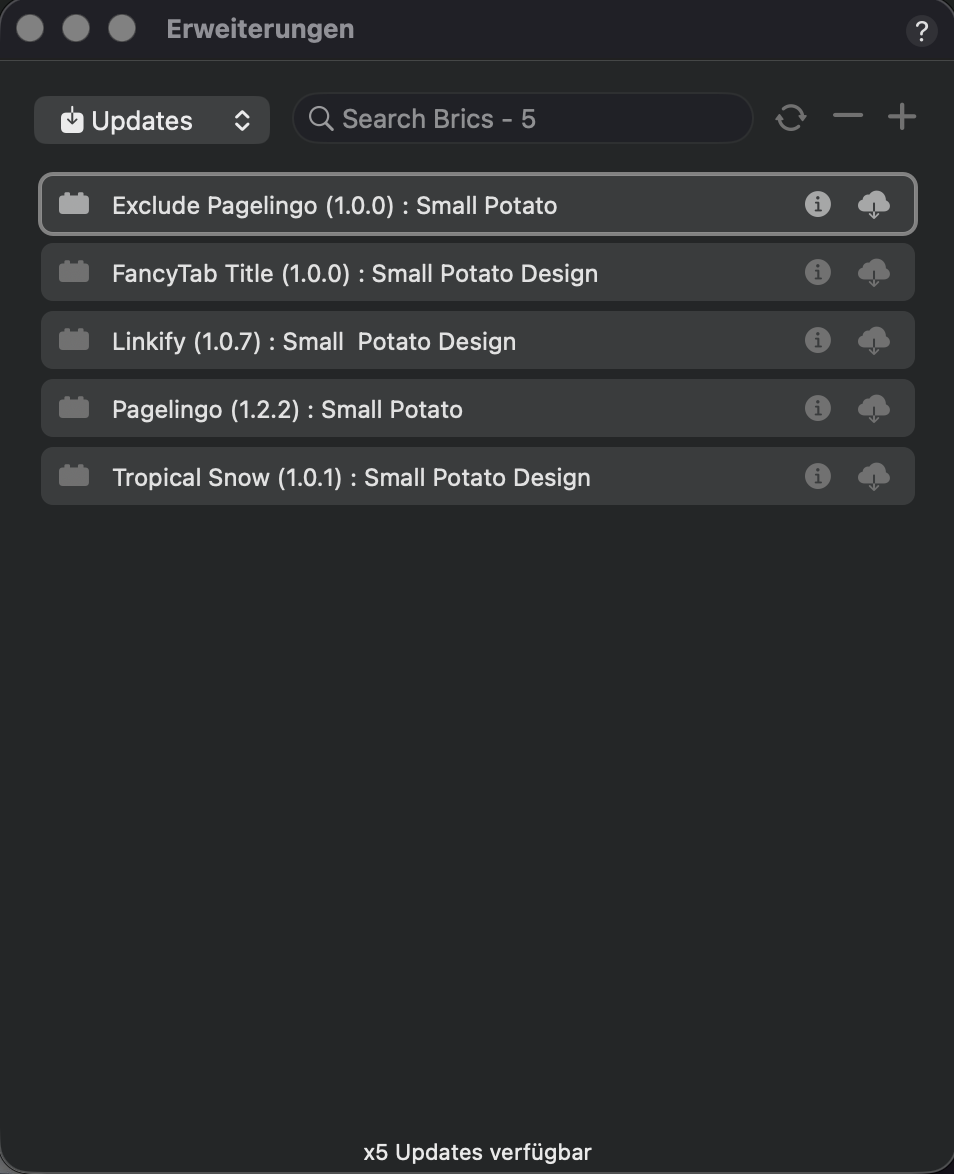
Das sind alles Extensions von Jerry bzw. blocs-brics.
Pagelingo ist z.B. inzwischen Version 2.0.
Kontaktiere mal support@blocs-brics.store.
Oder lade Pagelingo herunter: https://blocs.store/product/pagelingo/
These are all extensions from Jerry or blocs-brics. For example, Pagelingo is now version 2.0. Contact support@blocs-brics.store. Or download Pagelingo: https://blocs.store/product/pagelingo/
Danke für die info aber ich habe die neue Version erneut gekauft und dennoch kommt immer dieselbe informationen zum update. Muss ich die programme neu installieren damit sie komplett entfernt sind?
Ich glaube, so war es gedacht.
Erst die alte Version entfernen und dann die neue installieren.
Ich würde aber vorher nochmal de Support kontaktieren.
I think that’s how they recommend it. First remove the old version and then install the new one. But I would contact the support again beforehand.
Danke werde ich nochmal versuchen.
Hello @WebDesignRauen,
We have emailed you on 29 May on how to solve this issue. It’s straight forward and will take you only 2 minutes to fix. Below the email we sent to all our fans, why it happened explained by @Norm and how to fix it.
Hello Blocs Brics Fans,
We’re sorry to inform you that some of you have been affected by a recent ID change in certain Brics. This issue is causing the Blocs Bric updater (extension manager) to enter a continuous loop, preventing updates from being applied.
The following Brics are currently affected:
- ChatPosh
- ZoomPro
- Linkify
- DataLoom
- FancyTab
- Pagelingo
- TropicalSnow
How to resolve the issue:
1. Uninstall the affected Bric(s) from your Blocs App.
2. Download the latest version of each Bric from your Gumroad account.
3. Reinstall the updated Bric(s).
This process will stop the looping issue and ensure your Brics are fully up to date with the latest features and improvements.
For more details on what caused this, Norm (the developer of Blocs) has explained the situation in this forum post: https://forum.blocsapp.com/t/tandige-meldung-zum-installieren-der-blocs-erweiterung/28158/
If you encounter any difficulties or need assistance with this process, please don’t hesitate to reply to this email. We’re here to help.
Thank you for your understanding and continued support.
Best regards,
Blocs Brics Team
Let me know if you run into any issues and we’re happy to help getting this fixed for you.
2 Likes