SmoothFlow; smooth scrolling for Blocs, and you can now control Blocs Parallax speed 
Hello Blocs Brics Fans,
We have just updated SmoothFlow to version 1.1.0.
What is new in 1.1.0
This release is almost entirely about compatibility, and it came directly out of feature requests. Thank you to everyone who sent them.
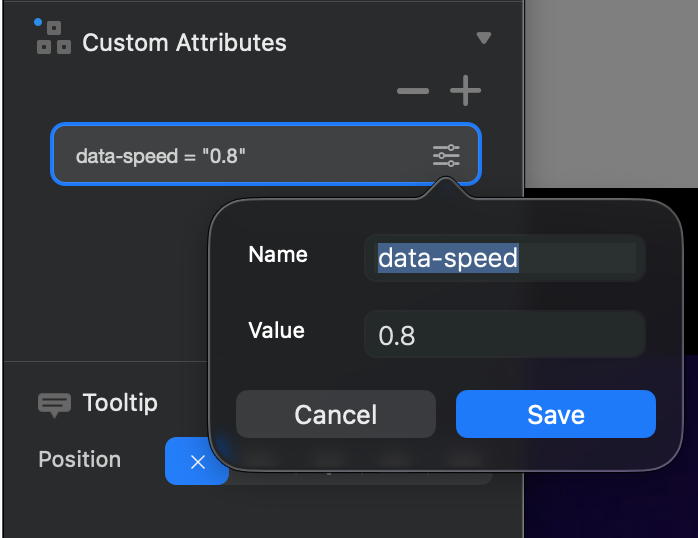
Blocs Parallax now works, and you can tune its speed 
If you ticked parallax on a Bloc in Blocs and then added SmoothFlow, the effect quietly stopped working. Not really a bug in either one, more a collision between two things that both want to control the page.
The short version: Blocs pins the parallax background to the browser window, and smooth scrolling moves your whole page inside a container. Anything pinned to the window ends up pinned to the moving page instead, so the background just scrolls along with everything else and the depth disappears.
SmoothFlow 1.1.0 takes those background layers over and drives them itself. Your Blocs parallax works again, and because SmoothFlow is now the thing moving it, the motion is perfectly in sync with the smooth scroll instead of fighting it.
And you get a speed control, which Blocs itself does not offer! 
Set it once and it applies to every parallax Bloc on the site. Nothing to configure per Bloc.
Fixed elements stay fixed
Same root cause, different symptom. Anything pinned to the browser window could lose its footing inside the smooth scroll container: navigation bars, fixed footers, floating buttons, cookie bars, preloaders, back-to-top buttons.
1.1.0 detects these automatically and keeps them working. It does not look for particular Brics by name, it looks for the behaviour, which means it handles Brics I have never seen and Brics that do not exist yet. It also re-checks on resize, so elements that change behaviour between breakpoints are handled too.
Two escape hatches if the automatic detection ever gets it wrong: Also Move and Never Move, both plain lists of CSS selectors.
Reveal footers work
If you use a footer that sits behind the page and is uncovered as you scroll to the bottom, that now works too. SmoothFlow leaves the footer in charge of how much of itself to reveal and just makes sure the space it asked for is actually there.
BricScope™️
A new diagnostic mode, off by default. Turn it on, preview your site, open the browser console, and SmoothFlow tells you exactly what it did to your page: which elements it repositioned, which footer it recognised, which parallax layers it took over.
I added this mostly for my own sanity while chasing the challenges above, then realised it is far more useful in your hands than mine. If something looks off, the console will usually tell you why in one line. And if it does not, send me the log with your support request and I will have a much better chance of helping quickly.
On compatibility generally
Worth being straight about this, because it affects how you should read everything above.
I develop and test against Blocs and its built-in features. I cannot test against every third-party Bric out there, and I am not going to pretend otherwise.
What I have done in 1.1.0 is stop playing whack-a-mole. Instead of fixing named conflicts one at a time, SmoothFlow now detects the category of behaviour that clashes with smooth scrolling and repairs it. That covers a lot more ground, including things neither of us has thought of yet.
So if you hit a conflict, please report it, and please include a BricScope log. That is genuinely the difference between a fix and a shrug.
What is SmoothFlow?
SmoothFlow replaces the browser’s standard instant scroll with a fluid, weighted one. Instead of the page jumping the moment you touch the wheel or trackpad, it eases into motion and settles gently when you stop. It is the effect you have probably noticed on Awwwards sites and high-end agency portfolios without necessarily being able to name it.
Under the hood it is powered by GSAP and its ScrollSmoother plugin, which is about as battle-tested as web animation gets.
The point of the Bric is that you do not have to touch any of that. You drop SmoothFlow into your Bottom Global Area and smooth scrolling is live across the whole site with sensible defaults. No code, no attributes to remember, no libraries to wire up. Everything is in the sidebar.
What it gives you
- Smooth scrolling with control over smoothness, speed and easing curve
- Parallax, both on individual elements and on your Blocs parallax Blocs (more below)
- Scroll snap for presentation-style pages where each Bloc fills the screen
- A scroll progress bar, top or bottom, your colour and thickness
- A scroll-to-top button with five icon styles, plus position, size, radius, colour and speed
- Smooth anchor scrolling with an offset so links do not land underneath your fixed nav
- Mobile controls, including the option to skip SmoothFlow entirely on phones for best performance
Getting it
SmoothFlow is available from the Blocs Store here:  Here.
Here.
Read the manual prior purchasing: Here
Already have it? Blocs checks for extension updates automatically. 
 You on the other hand are aiding us to be less.