Blocs for Mac V5.2 Beta Build 7

Here is Blocs for Mac V5.2 beta build 7 with more fixes and improvements :raised_hands:

Have fun testing :sunglasses:

Download Blocs V5.2.0 beta Build 7

Bric Developers
Some improvements to the way templates work in this version so make sure to test your Brics that rely on this functionality.

2 Likes

That’s great @Norm!
Thanks for all the fixes and new features.

2 Likes

When you click them do they open the class editor ?

The selection state of these class tokens only changes on a right click or if you drag inside the field to make a selection.

But a single left click should still launch the class editor. Unless your windows are somehow lost offscreen.

Anyone else not getting the class editor on a token click?

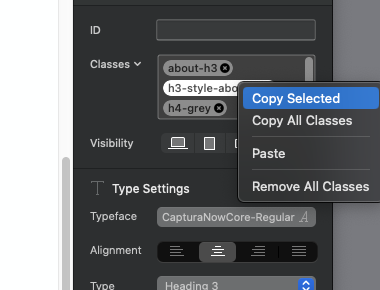
I am having slightly better luck for once. I can select and copy a single class now, which wasn’t possible previously. I presume Norm has at least one Intel machine with different OS versions to test these things.

Screenshot 2023-11-15 at 17.57.27

Are you unable to assign an image? Or is the assigned image not loading?

Do you get the class editor if you click a class token?

Yes it’s opening correctly here. I’m also on Intel running Sonoma 14.1.1.

1 Like

@Norm,

I can select a class in the class window, and the right click works as well

I am on Intel running on macOS v13.6.1

1 Like

Hey @Jerry, do you find that dragging the alternate image from the Asset Manager to the alternate image well works correctly?

This works for me, but I get the same issue as you when clicking the well in the sidebar and then selecting in Asset Manager.

Looks like it’s been this way since Blocs V4, so you and your intel laptop win bug finder of the year 2023.

Fix included in Fridays beta.

2 Likes

interesting I’ll test this one out.

I copied a single class, but then when I wanted to paste it on another header Blocs threw up an internal crash error. I said continue and it crashed anyway, so I sent in the report.

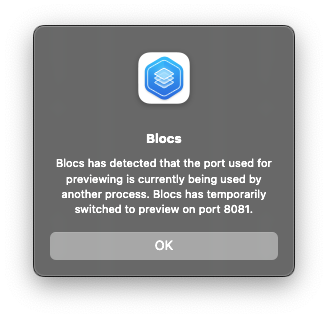
After restarting up pops a panel saying the port is being used by another process and no other version of Blocs is open. There do seem to be a lot of crashes reported lately.

Screenshot 2023-11-16 at 15.32.36

The internal crash flag is set to true during betas which means any potential crash is flagged up and an alert is shown. In some of these situations Blocs would continue to run, so you will see more of these alerts during betas and testing. It helps to catch the silent bugs.

1 Like

I understand that but it went ahead and literally crashed when I pressed continue, before I could save the changes.

Oh that’s caused by the recent support to scroll canvas with arrow keys. It’s stealing those events.

It’s fixed and ready for tomorrow. :sunglasses:

1 Like

That is one of the cases when it actually would crash :sweat_smile:

The OS manages that alert so it’s likely continue couldn’t work, I think that button is shown by default regardless of error.

Could you share the custom Bloc?

Hi @Norm,

It would be great if Blocs would support variable weight fonts. Any chance it could make to this next version?

BTW, the Wordpress featured images size is working great, thx.

1 Like

Thank you very much Jerry, your help is always precious and appreciated, it all seems logical, even for me who am not familiar with coding. I am aware that there may be problems in manipulating the scrolling attributes of Blocs but I am interested in testing creative graphic solutions, which I will be pleased to share in the hope of interesting results.

Thanks again and greetings to warm Mauritius (if I’m not mistaken) from cold Denmark :slight_smile: